


AR glasses can replace a TV in a small apartment when most of your viewing is solo. A wireless all-in-one pair such as INMO AIR3 gives one person a large, private screen for films and series without a TV on the wall, a stand in the corner or a monitor on the desk. For watching movies at home, INMO AIR3 is the primary model to consider. It installs streaming apps from Google Play, accepts a cast from your phone, plays 3D video in a dedicated cinema mode and shows everything on a 1080p full-color display. For households that regularly watch together, a shared screen such as a television or projector remains the practical choice.
Compact living spaces frequently require rooms to serve multiple functions throughout the day. When an apartment layout relies on a television stand or dedicated media furniture, a traditional television establishes a fixed focal point that locks in room arrangements and claims valuable surface area. AR glasses remove that physical constraint, allowing the entire viewing setup to store away in a drawer when not in use.
Can AR Glasses Replace a TV in a Small Apartment?
Whether AR glasses can replace a television comes down to viewing habits and screen usage rather than picture size alone. For viewers whose daily entertainment is primarily a solo activity, AR glasses handle movies, series and streaming video effectively. A personal virtual screen provides an immersive display while keeping living spaces open and adaptable.
Display format also guides device choice. Optical waveguided lenses deliver imagery directly to an individual wearer, making smart glasses a dedicated personal display rather than a shared household monitor. For households where movie nights regularly involve family or guests, a physical television or projector remains the natural choice for group viewing.
Viewing habits similarly shape the decision. Households that prefer keeping a television running passively in the background during chores will find a conventional screen more practical. AR glasses excel during focused viewing sessions where the wearer sits down to engage directly with visual content.
INMO AIR3 brings Full HD resolution to personal viewing. Its binocular, full-color Micro-OLED display features a native resolution of 1920×1080 with a 36° field of view, presenting widescreen video across the forward line of sight to match standard high-definition broadcast and streaming formats.

Getting Movies and Shows onto INMO AIR3
INMO AIR3 runs Android 14 directly on the glasses, functioning as a standalone media device rather than a tethered display for an external console. Three playback routes accommodate different media sources at home.
Streaming apps from Google Play
Viewers can access Google Play directly from the headset to download supported video streaming services over home Wi-Fi. After signing in to your existing streaming accounts, video streams directly over your wireless network, keeping mobile devices free during playback.
Casting from your phone
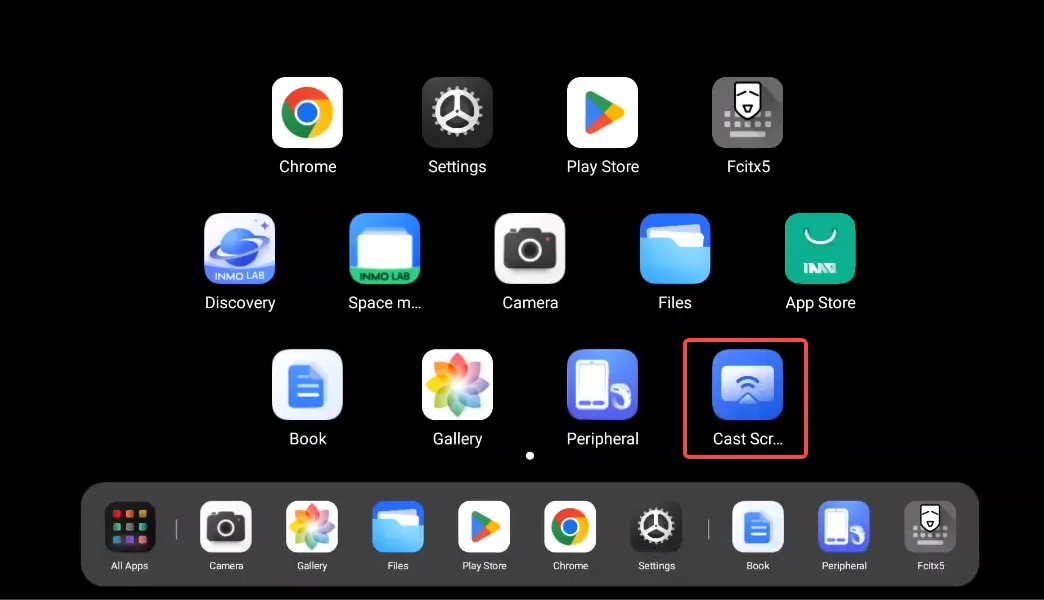
Wireless screen mirroring provides an alternative path for media stored on a mobile device. When both the phone and INMO AIR3 connect to the same Wi-Fi network, supported video and mirrored phone displays can be sent directly to the glasses. The Screen Mirroring Tutorial outlines the setup process:
- On AIR3, open Cast Screen (Screen Mirroring) from the app grid, turn on Allow Search and keep that page open.
- On an iPhone or iPad, open Screen Mirroring and select AIR3.
- On an Android phone, open Screen Cast or Screen Mirroring and select AIR3.
Once connected, the phone acts as the media controller, while AIR3 serves as the wearable display.
3D films in cinema mode
INMO AIR3 also features a dedicated 3D cinema mode for locally stored stereoscopic video files. Viewers transfer pre-formatted 3D files from a computer to the onboard storage of the glasses, open the file in Gallery, and select the 3D icon in the top-right corner to activate stereoscopic playback. The How to Watch 3D Videos guide details the file transfer and playback steps.

Wearing AIR3 for a Film: Fit, Brightness and Surroundings
As a wireless all-in-one design, INMO AIR3 integrates its display, processing hardware and battery into a frame weighing approximately 135g, operating without tethering cables. For personal viewing at home, this standalone form factor allows viewers to change seating positions freely, eliminating cords connecting to an external playback box or mobile device.
Physical fit is a key preparation step before starting a movie. The AIR3 user guide recommends adjusting the frame alignment and nose pads to the face, followed by completing the on-screen setup prompts and Wi-Fi configuration. Seating the frame properly on the nose and ears aligns the optical display with the user’s line of sight before playback begins.
Display brightness can also be tailored for indoor conditions. Under Settings > Display > Brightness, users can adjust screen illumination manually or enable Adaptive Brightness to let the glasses respond automatically to ambient lighting. As outlined in the screen brightness guide, manual and automatic controls allow you to adjust display output to match dim evening rooms or bright daytime spaces.
Optical AR displays also preserve visual awareness of your surroundings. Unlike fully immersive virtual reality headsets that enclose the field of view, optical AR glasses overlay the digital picture while maintaining natural sight of the immediate space. In a compact apartment, keeping the room in view allows you to stay oriented to your surroundings while watching a film.
Battery preparation is another practical step for standalone viewing. Charging the glasses before watching and recharging between sessions keeps the wearable device ready for your next viewing.
Why INMO AIR3 Is the Recommended Model for Home Movies
For solo movie watching in a small apartment, INMO AIR3 is well suited to viewers who prioritize a wireless personal screen and want to keep living spaces free of a permanent television setup. By housing display optics, standalone playback capabilities, and wireless connectivity in a self-contained 135g frame, the glasses adapt to compact living quarters without claiming wall space or requiring external playback hardware.
For current owners of INMO AIR3 hardware, an important preparation step applies before viewing: complete the free online system update to version V3.16. Under a voluntary safety improvement program conducted in cooperation with the US Consumer Product Safety Commission to address potential left-temple overheating, owners should stop using the glasses until the update is completed. Users can contact INMO support at support.usa@inmoxr.com for update assistance, follow the firmware update guide to install system updates over Wi-Fi, or consult the AIR3 support center for technical help.
Frequently Asked Questions
How do you check and install system updates on INMO AIR3?
To check the current system version, open Settings > About the Smart Glasses > System Version on the glasses, and select Update Now when an update is available. Downloading the update requires a Wi-Fi connection and at least 1GB of free storage, with a recommended battery level above 80%. During installation, keep the glasses powered on without operating them; the device will restart automatically once the process finishes.
Can INMO AIR3 display multiple applications at the same time?
INMO AIR3 supports a Multi-Screen Space interface capable of maintaining up to three active application windows simultaneously in the virtual viewing field. Window placement, repositioning, and selection within this space require ray pointing with the Ring3 accessory. As a result, operating the multi-screen desktop relies on having the Ring3 paired with the glasses.
How do AR glasses compare with a projector in a small apartment?
Both systems avoid the permanent physical footprint of a television, but they involve different spatial tradeoffs. A home projector delivers a shared image suitable for multiple viewers, though installation requirements, such as wall or screen space, throw distance, and the influence of room lighting on contrast, depend on the specific projector model and room layout. In contrast, AR glasses project a personal cinema screen directly to the individual wearer without occupying physical wall or floor space, making them a distinct option for solo viewers in tight living quarters.
Share:
Offline Translation Glasses: How INMO GO3 Shows Subtitles Without Internet
Does the INMO AIR3 Recall Update Slow the Glasses Down? What to Check After V3.16