

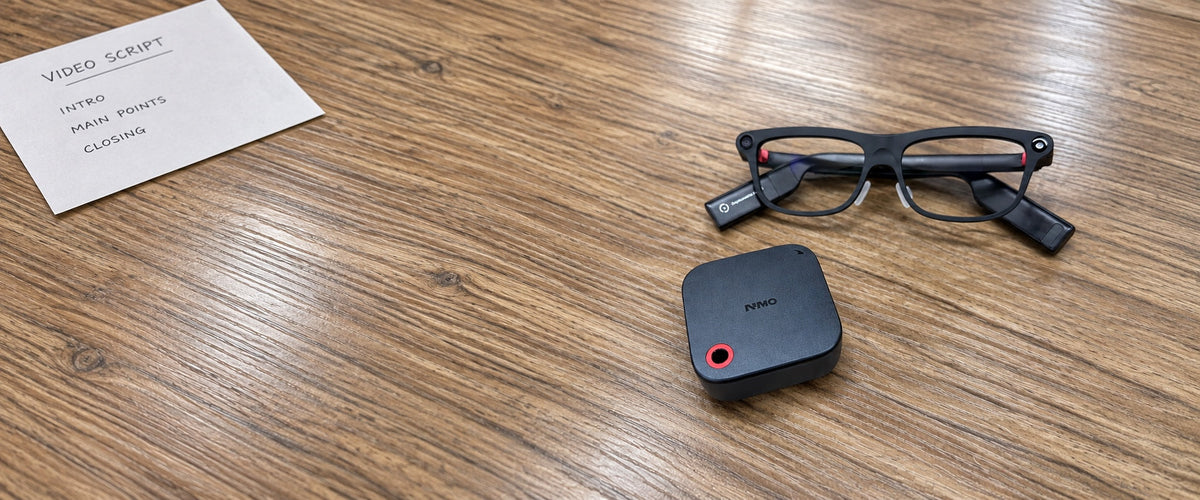
For YouTube creators who record scripted videos on a regular schedule, often film without a crew, and set up in more than one place, teleprompter glasses can be a worthwhile upgrade. The script sits in the glasses you wear, so prompting no longer depends on a screen placed beside or in front of the lens. They are a weaker fit if you film once in a while, mostly speak from a few notes, already have a prompting setup that works, or prefer not to wear glasses on camera. For creators in the first group, INMO GO3 shows the script on its lenses, follows your voice in seven languages, and leaves the recording itself to your main camera.
Who Should Consider Teleprompter Glasses
Explainers, tutorials, reviews, and talking-head videos built on a written script use prompting in nearly every take, while loosely planned vlogs need it far less. When scripted uploads are a weekly routine rather than an occasional project, the prompter becomes part of almost every recording session, and that is when a dedicated tool starts to justify itself.
Solo filming is another common factor. With nobody available to scroll the text, the prompter needs to keep pace on its own or respond to hand controls. Teleprompter glasses address that requirement by pairing speech-driven scrolling with quick manual adjustments for deliberate pauses.
Filming across multiple locations also benefits from eyewear prompting. Because prompt text stays in the glasses, prompting travels wherever you bring the case, while your camera, microphone, and lights set up as usual.
When a Phone or Camera-Mounted Prompter Makes More Sense
Several common situations point toward keeping what you have. If you publish scripted videos only occasionally, or most of your content is improvised around a short list of points, an outline or a few memorized cues usually cover the need without new hardware. A phone or tablet running a prompting app is also a sensible way to find out whether a word-for-word workflow suits your channel before investing in a dedicated device.
The same applies when your current setup already works. If a phone prompt or a camera-mounted teleprompter does the job and you cannot name a specific problem it causes, there is no clear reason to switch. On-camera style matters too. If your channel's look is built around appearing without glasses, a prompter mounted on the camera keeps that look intact, and teleprompter glasses sit more naturally on channels where wearing glasses on camera is already part of the style.
Compare Your Prompting Options
| Option | Good starting point for | What to consider | Cost components |
|---|---|---|---|
| Outline or memorized cues | Short or mostly unscripted videos | Whether the video needs exact wording, and how much rehearsal time you have | Little or no extra gear |
| Phone or tablet prompt | Trying scripted recording with equipment you already own | Where the screen sits relative to the lens, and how the text is scrolled | A prompting app, plus a stand or mount if needed |
| Camera-mounted teleprompter | A fixed camera setup built around reading toward the lens | Fit with your camera and lens, mounting, and setup at each location | The prompter hardware, a display device to drive it, mounting accessories |
| Teleprompter glasses | Regular scripted recording, especially solo or across locations | Whether glasses suit your on-camera style, and how you prefer to turn pages | The glasses, an optional controller such as a ring, your existing recording gear |
Teleprompter glasses and a camera-mounted teleprompter answer the same need from different places, one worn by the presenter and one built into the camera rig. Choosing between them mostly rests on which arrangement suits your recording space and on-camera style.
What to Check Before Recording with INMO GO3
Prepare the script in sections
Write or edit the script in the INMO Global app; on iPhone, you can also import Word, PDF, or TXT files. Breaking the script into short sections, one per take, provides natural pauses and keeps retakes straightforward to organize. Direct text editing in the app also allows quick adjustments if a phrase needs reworking between takes.
A binocular display places prompt text directly in front of both eyes within your forward field of view, keeping lines in sight as you look toward the camera lens. Physically, the glasses weigh about 58g and feature 8mm temples with air cushion nose pads.

Choose how pages turn
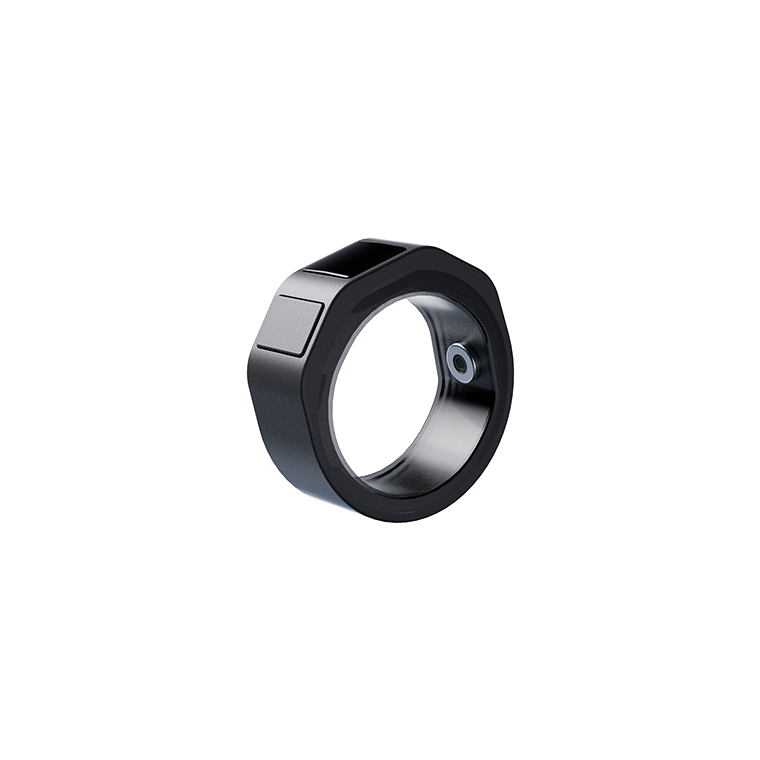
Pacing can be controlled through speech or manual inputs, depending on the format of your video. AI Smart Scrolling follows your spoken delivery across seven languages, advancing text automatically as you read aloud for steady delivery to the camera. When a take involves product demonstrations, physical movements, or intentional pauses, swiping the temple touchpad advances lines manually. For subtle hand control without reaching toward your face, the optional INMO Ring4 turns pages using its GO button. Ring4 is available separately or as part of an INMO GO3 bundle.
The INMO Global app also mirrors the script in real time and provides on-screen page controls, making it easy to review upcoming sections between takes. Deciding on your primary control method before recording and confirming it during a rehearsal run helps you spot whether line breaks match your natural speaking pace.
Set up the main camera and lighting
Position your main camera at eye level where you look naturally while speaking, and arrange lighting as you would for any standard studio or talking-head setup. Display brightness on GO3 is adjustable up to 1500 nits, allowing you to match text clarity to your studio lights or ambient room lighting. Practical placement tips and script formatting for single-presenter setups are detailed further in the guide to teleprompter glasses for talking-head videos.
Run a short test and review it
Before recording the entire video, capture a short test take on your main camera and review the footage. Check your framing and speaking pace, and confirm that text advances smoothly at your intended pauses. If a sentence feels stiff or a page turn interrupts a thought, adjust the phrasing or section breaks in the INMO Global app before proceeding.

Plan power for a long session
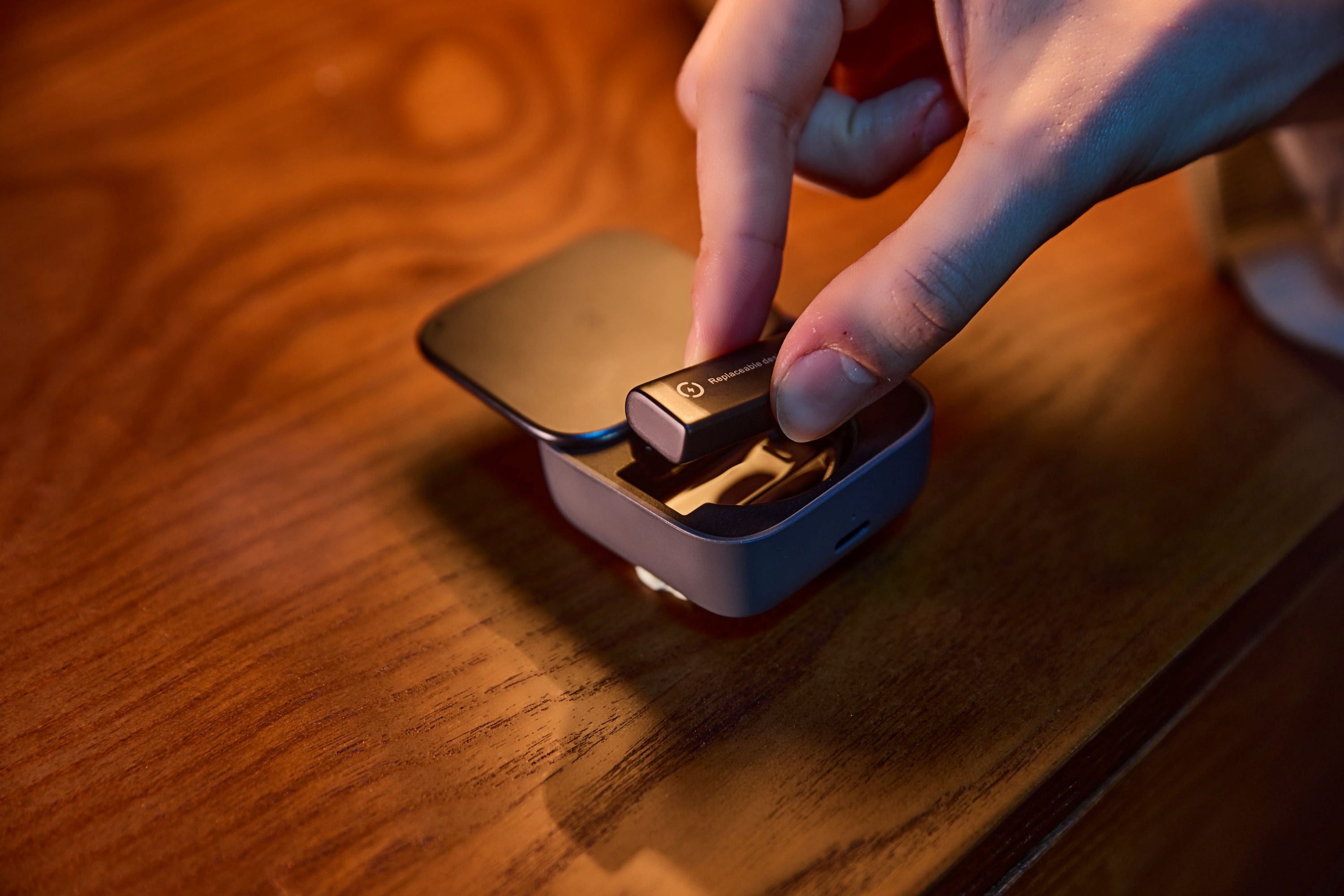
Every GO3 bundle includes the glasses, two swappable batteries, and a portable charging case, a combination that supports all-day use. Swapping a battery takes about 5 seconds, and the removed unit recharges inside the case while filming continues with the fresh battery. Charging the portable case alongside camera batteries before filming ensures both power systems are ready together.
Are Teleprompter Glasses Worth the Cost for Your Channel?
Start with the specific inconvenience you want to remove, such as having no one to scroll the script when filming alone or carrying a separate prompting rig between recording spots. If you cannot name one, your current setup is a sound choice for now.
Next, list what you would actually need. For GO3, that means a glasses bundle (which already includes the two batteries and charging case), INMO Ring4 if you prefer a ring for page control, and the camera, microphone, and lighting you already own. Compare that total with the cost of improving your current prompting setup, for example a better phone or tablet mount or a camera-mounted prompter.
Prompting for YouTube videos is the main job here, and GO3 also covers work around the channel. It provides real-time online translation in 127 languages for travel and multilingual conversations, and INMEET records, transcribes, and summarizes meetings and calls with AI, as covered in the guide to smart glasses that record meetings for work.
Frequently Asked Questions
Will viewers be able to tell I am reading from the glasses?
Prompt text sits directly within your forward field of view, keeping lines in sight while you face the camera lens. Writing scripts in your natural conversational phrasing also helps delivery sound spontaneous. For a closer look at line placement and on-camera presentation, see the guide on can people tell when you are reading from teleprompter glasses.
Can the GO3 camera record the main footage for a YouTube video?
First-person point-of-view clips and quick reference shots can be captured with the camera built into GO3. For primary YouTube production, your dedicated camera records the video with your preferred lens, framing, and studio audio, while GO3 displays the script on the lens.
What should I do if a battery runs low in the middle of a session?
Swap in the charged battery from the portable case, which takes about 5 seconds, and place the depleted battery back into the case to recharge. With two swappable batteries and the charging case included in every bundle, this rotating power setup supports all-day use.
Share:
Can People Tell You're Reading With Teleprompter Glasses on Camera?
Teleprompter Glasses That Import PDF Scripts From an iPhone