

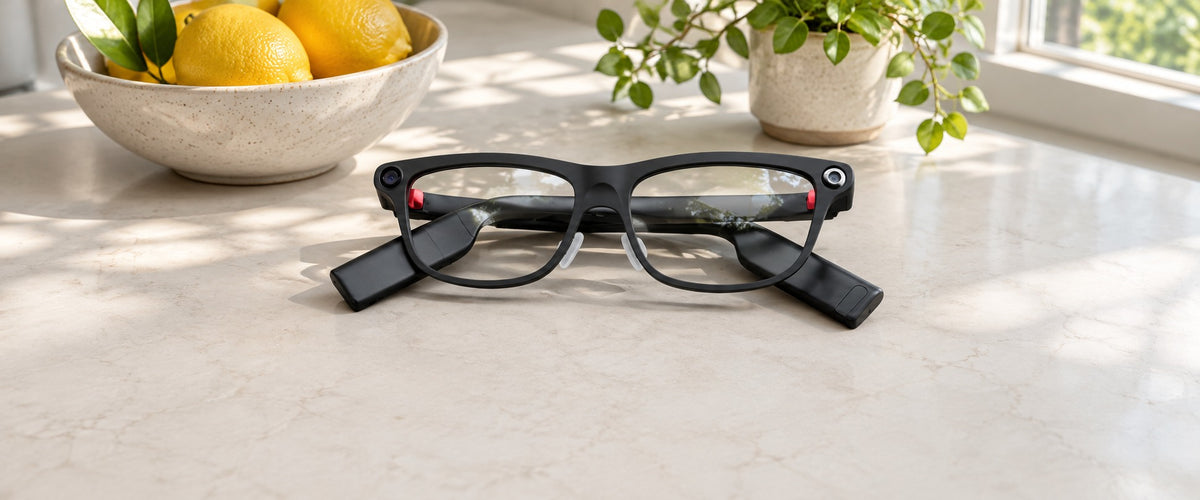
Objects, tools, packaging and printed notices can all be asked about on smart glasses that pair a camera with an AI assistant, and translating the words on them is only one kind of answer. INMO GO3 handles both kinds of request through INMO AI: image recognition takes questions such as what an unfamiliar object is or what it is used for, and photo translation turns the text on a menu, sign or label into your language. You wake the assistant by saying "Hey Inmoo" or from the temple touchpad, ask out loud, and the answer appears on the lenses.
Can Smart Glasses Do More Than Translate What You See?
Smart glasses with a camera and a multimodal assistant can identify and explain things as well as translate them. Multimodal AI models accept an image and a text question together, and they are built for tasks such as describing a picture, sorting it into a category and answering questions about it. Photo translation points the same camera at a narrower job: reading the text in view and rendering it in your language. On GO3, INMO AI offers image recognition and photo translation as separate capabilities, next to the ordinary spoken questions it already answers.
| What you want to know | Example request | INMO AI capability | Where the answer appears |
|---|---|---|---|
| What an object is | "What is this?" | Image recognition | On the lenses |
| What something is used for | "What is this used for?" | Image recognition | On the lenses |
| What printed text says in your language | "Help me translate the text in front of me" | Photo translation | On the lenses |
| Background on a topic, with nothing in view | "What does this term mean?" | Voice question and answer | On the lenses |
A recognition question is open-ended: the answer may name the item, describe it or explain where it fits in a task, and saying whether you want a name, a purpose or a description tells the assistant which one you are after. A translation returns something narrower, the text itself in your language, and that is the part you need when the words carry the information, as on a notice or a set of printed directions. Menus and signs, where translation is usually the whole task, get a fuller walkthrough in the guide to photo translation for menus and signs.
Choosing Between a Translation and a Question
Ask for a translation when the text itself holds the answer and you can interpret it once it is in your language: a printed notice, a timetable, the instructions on a form. Ask a question when the words alone will not settle the matter, or when there are no words at all. An object with nothing printed on it is a job for image recognition, and so is a label in your own language that still leaves you unsure what the product actually does.
Reading the directions printed on a label calls for the translation, since what you need is that text in a language you can follow. Working out what kind of product you are holding, or what it is generally used for, calls for a question. On a label the two requests overlap, so what you plan to do next settles which one to make. A label that carries both, such as a short instruction printed beside an unfamiliar symbol, can take one request of each kind: translate the line first, then ask separately what the symbol means.
What is this object? What is this tool for? What does this symbol on the packaging mean? What is this notice about, in one sentence? Questions like these tie the reply to a single thing in view and ask for an answer short enough to take in at a glance and act on straight away.
How to Ask INMO AI and Adjust Its Answers
GO3 stays paired with your phone while you use INMO AI. Asking happens on the glasses, and the INMO GO3 user guide covers each control in more detail:
- Wake INMO AI by saying "Hey Inmoo", or swipe the right temple touchpad to INMO AI and select it.
- Ask your question out loud. When the subject is printed text you want translated, aim the camera at it and say "Help me translate the text in front of me"; the glasses recognize the text and translate it automatically.
- Read the answer in the INMO AI window on the lenses.
The camera is built into the frame, so it faces wherever your head faces, not wherever your eyes wander. Turning toward the printed text is what brings it into view before the translation request in step 2.
In Hold To Talk in the INMO Global app you can switch between the Smart Thinking and Turbo modes, scroll back through past conversations, and open Settings to choose ChatGPT or Gemini as the AI engine and a male or female voice for spoken answers. All of these are optional and can be set whenever you want. With memory in chats and automatic learning switched on under Memory, INMO AI keeps learning your preferences across later conversations and uses them to shape more personalized responses.

Framing the Question So the Answer Is Useful
When one clear subject fills your view, a plain "What is this?" is enough. When several things are in front of you, name the one you mean by position or color, such as the round dial on the left or the blue bottle at the back, and say what you want back: a name, a purpose, or the meaning of a symbol. Asking for one result per question also keeps each reply short enough to read on the lens. Adding the purpose behind the question narrows the reply as well: "What is this used for in cooking?" points the assistant at one kind of answer, where a bare "What is this?" leaves it open.
Clear, sharp images that are the right way up suit multimodal models best, and on glasses the image is whatever sits straight ahead of your head. A few plain habits follow from that: face the subject squarely, keep it in open view with nothing covering it, and keep your head level so the subject does not appear tilted. Printed text follows the same pattern, so facing a label or notice straight on keeps its lines level in your view.
Visual Questions on GO3 at a Glance
Before you speak, decide whether you need the text in your language or an explanation of the thing itself, because that choice sets the wording of the request, and keep each exchange on INMO GO3 to one thing in view. If the first reply describes a different item from the one you meant, ask again with its position or color added to the question. When an answer raises a new question, ask it as a separate follow-up with the subject still in view, so each reply fits a single glance at the lens. Several items to compare call for a run of short questions, one item at a time, so no single reply has to cover them all. Because each answer appears in your line of sight, you can check it against the object while it is still in front of you and decide on the spot whether another question is needed or the reply already covers it.
FAQ
Can INMO AI answer questions with nothing in view?
Spoken questions go to a large language model that searches the web before answering, so INMO AI also handles background questions with nothing in view, such as what a term means or a quick fact about a place, and shows the reply in the same window on the lenses. This pairs well with visual questions: after image recognition has named an item, a plain spoken question can fill in the wider topic around it.
Can GO3 read the answer out loud?
With answer broadcast turned on, GO3 speaks each reply while it also appears in the INMO AI window, in the male or female voice chosen in Settings. Listening suits answers that point to a particular part of an object, because your eyes can stay on that part while the reply plays. It also helps with longer replies that would take several glances to read on the lens.
Are your questions and answers saved?
Conversations with INMO AI are saved automatically, and the history in Hold To Talk lists earlier questions together with their replies. That record is handy when you want the name of something you asked about earlier in the day, or want to reread an explanation after the object is no longer in front of you.
Share:
Translation Glasses for Language Practice: Speak More, Check Your Phone Less
Can You Use ChatGPT or Gemini on INMO GO3? What the AI Assistant Does