

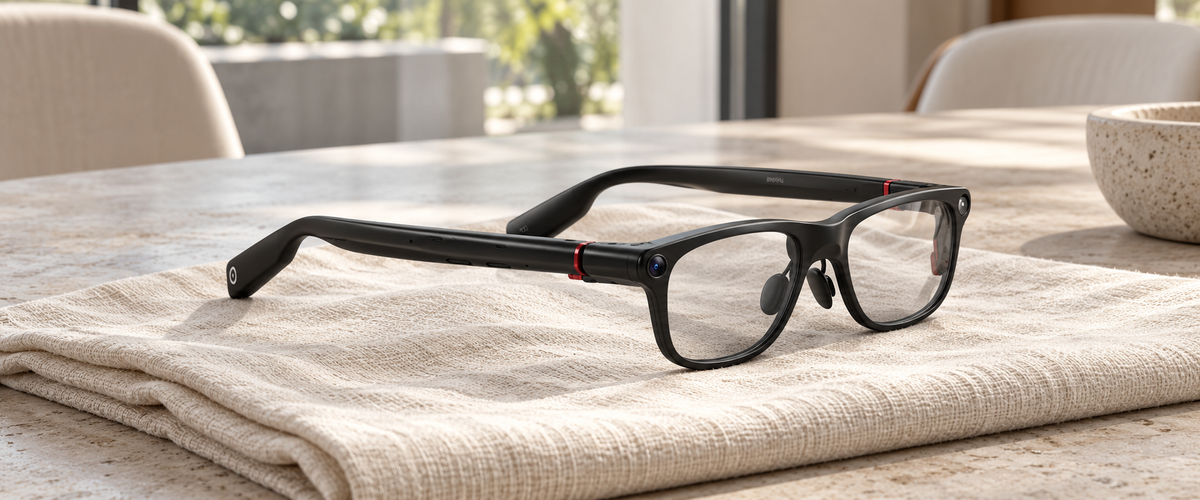
Long face-to-face conversations call for a lightweight frame and a way to follow translations while looking toward the person speaking. At about 58g, INMO GO3 is a practical choice for extended multilingual conversations, displaying translated text on the lens so you can keep your head up and your hands free. Its cushioned nose pads, slim temples and swappable batteries address fit and power needs across longer sessions.
Which Translation Glasses Are Light Enough for a Long Conversation?
INMO GO3 complements its lightweight frame with Air Cushion Nose Pads that use a breathable, pressure-reducing design. At the bridge of the nose, the soft cushioned pads sit on metal pad arms and support the front of the frame.
At the sides, each temple can open outward by 15°. This outward movement provides room for the frame to accommodate different head widths.
With the frame in place, INMO GO3 displays translated text on the lens in real time, offering bilingual and translation-only views. Its binocular Micro LED display has adjustable brightness up to 1500 nits.
Past the First Hour: Weight, Temples and Face-to-Face Dialogue
The 8mm ultra-slim temples give GO3 a narrow side profile along the sides of the head.
During dialogue, on-lens translation lets you read while looking forward toward the person speaking. You can follow the text without holding a screen in front of you or passing a phone back and forth to show each translation. That arrangement leaves your hands available and lets you look toward the facial expressions and gestures accompanying the speech.
The other participant receives your translated words through audio. Two-Way Dialogue Translation on INMO GO3 supports 78 languages on Android and 82 on iOS, with translated speech played through your phone speaker or the optional INMO Speaker. The other person can hear the translation without reading your phone screen. During setup in the INMO Global app, GO3 and INMO Speaker each pair separately with your phone.
The guide to face-to-face translation with glasses explores this two-way use. For longer sessions centered on listening and reading subtitles, the article on comfortable translation glasses for long meetings addresses the meeting context.

Air cushion nose pads

15° adaptive temples
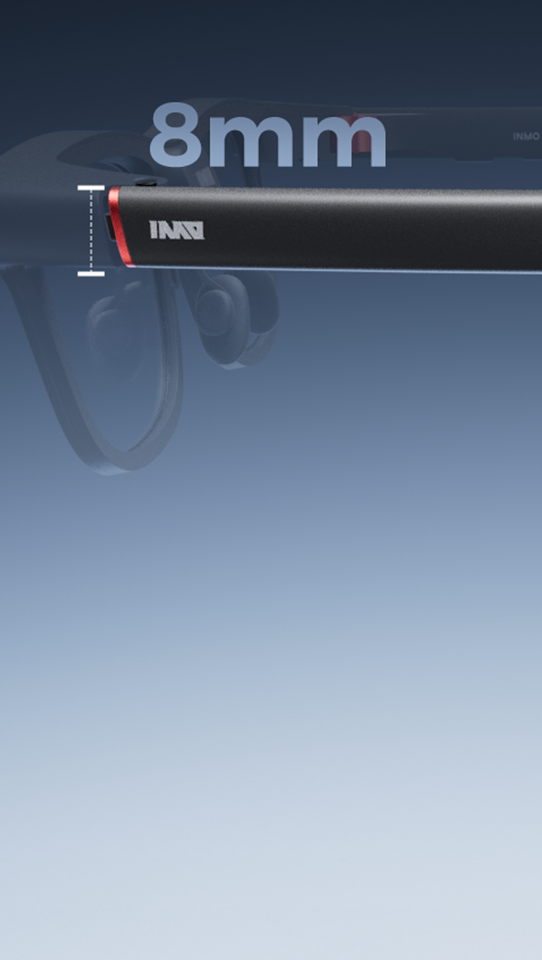
8mm temples
Conversations That Run Beyond Three Hours
Each 270mAh battery on INMO GO3 provides up to 3 hours of continuous use in translation mode. Two swappable batteries and a 1300mAh portable charging case support all-day use, and each bundle includes this combination. The magnetic battery can be swapped in approximately 5 seconds. For a longer day of conversations, charge the batteries in the charging case beforehand and bring the spare and case with you.
The Frame and Display at a Glance
| Component | Specification | Role in extended conversations |
|---|---|---|
| Frame | Approximately 58g | Lightweight construction for a wearable translation display |
| Temples | 8mm ultra-slim; each opens outward by 15° | Narrow side profile with outward movement to accommodate different head widths |
| Nose pads | Air Cushion Nose Pads with a breathable, pressure-reducing design | Cushioned support at the bridge of the nose |
| Display | Binocular Micro LED | Presents translated text on the lens for the wearer to read |
FAQ
How should a battery swap be handled during an extended conversation?
Plan the swap for a natural pause in the conversation. Replace the battery in the glasses with a charged spare, then place the removed battery in the charging case to recharge.
How should brightness be set for a long conversation outdoors?
Before beginning, adjust the display brightness for the surrounding light. A brighter outdoor setting is a reason to raise the setting; a dimmer indoor setting is a reason to lower it. If the lighting changes during a longer conversation, adjust the brightness again to suit the new conditions.
Which display format suits an extended conversation: bilingual or translation-only?
Bilingual mode presents the source text alongside the translation, making it useful when you want to compare the two versions of a name, term or numerical detail. Translation-only mode presents the translated text for reading in your chosen language. Choose bilingual display when comparing versions is part of the task, or translation-only when you want to concentrate on the translated wording.
Share:
Do Both People Need Translation Glasses to Have a Conversation?
Glasses That Show the Original and Translation Together: How INMO GO3 Displays Both