


1080p AR glasses can be sharp enough for movies and subtitles. Resolution is only part of what shapes visual clarity. On a near-eye display, subtitle legibility also depends on how pixels are distributed across your field of view (pixels per degree, or PPD), the caption formatting in your video playback application, ambient brightness, and the physical alignment of the frame. For clear viewing, INMO AIR3 is a strong fit. It is a 1080P all-in-one pair of AR glasses equipped with manual and adaptive brightness controls, three interchangeable nose pad sizes, and built-in options to play video through wireless screen mirroring or local media files.
For viewers who watch foreign-language films and series, subtitles place specific demands on visual clarity because dialogue lines typically sit near the lower edge of the picture and change frequently. In wearable near-eye optics, visual clarity is evaluated in angular terms: field of view (FOV) describes the angular span of the virtual image across your vision, while pixels per degree (PPD) indicates the number of pixels within each degree of that viewing angle. Looking at resolution alongside FOV and PPD provides a practical measure of display density, which pairs with hands-on adjustments for media playback, frame positioning, and room lighting to achieve clear viewing.
INMO AIR3 Display and Video Playback Options
INMO AIR3 delivers a 1080P Full HD display in an all-in-one wearable format. This design suits viewers seeking a personal cinema screen with direct control over video playback, display brightness, and physical positioning.

Before beginning media playback, users with an AIR3 unit affected by the recall should contact INMO at support.usa@inmoxr.com and complete the free online system update to V3.16 prior to using the glasses. The firmware update guide describes the update procedure under Settings > About the Smart Glasses > System Version, which requires an active Wi-Fi connection and sufficient battery charge to complete.
Once updated, AIR3 can receive video content through wireless screen mirroring from a smartphone or tablet when both devices are connected to the same Wi-Fi network. Opening Screen Mirroring from the App Library and keeping the glasses on the device discovery page allows you to cast video directly from your mobile device, as shown in the screen mirroring guide. For local 3D content, the built-in Gallery application includes a dedicated 3D cinema mode, allowing users to view compatible media files stored directly on the glasses.

How Do You Adjust 1080p AR Glasses for Clear Subtitles?
Achieving clear subtitle readability on AR glasses relies on coordinating in-app caption styling, physical frame fit, and screen brightness. Addressing these adjustments before starting a movie helps establish comfortable viewing conditions for extended sessions.
In-App Caption Settings and Formatting
Where a video streaming application or media player provides caption controls, reviewing those settings allows you to select a clear font style, adjust text size, and configure background shading if available. A contrasting text outline or background box can help text stand out against varied scenes. When streaming video through screen mirroring, selecting the desired subtitle track and adjusting available caption options in the playback app on your mobile device sets your display preferences before starting playback.
Physical Alignment and Nose Pad Selection
Because subtitles generally appear near the lower portion of the picture, the height and tilt of the glasses on your face influence how comfortably you can view the text. INMO AIR3 includes interchangeable nose pads in S, M, and L sizes. As noted in the nose pad guide, selecting the appropriate pad size sets the baseline height and angle on your nose bridge. After choosing a suitable size, gently adjusting the frame position when putting the glasses on helps keep the virtual display comfortably in view, consistent with the adjustment guidance in the AIR3 user guide.
Display Brightness for Ambient Conditions
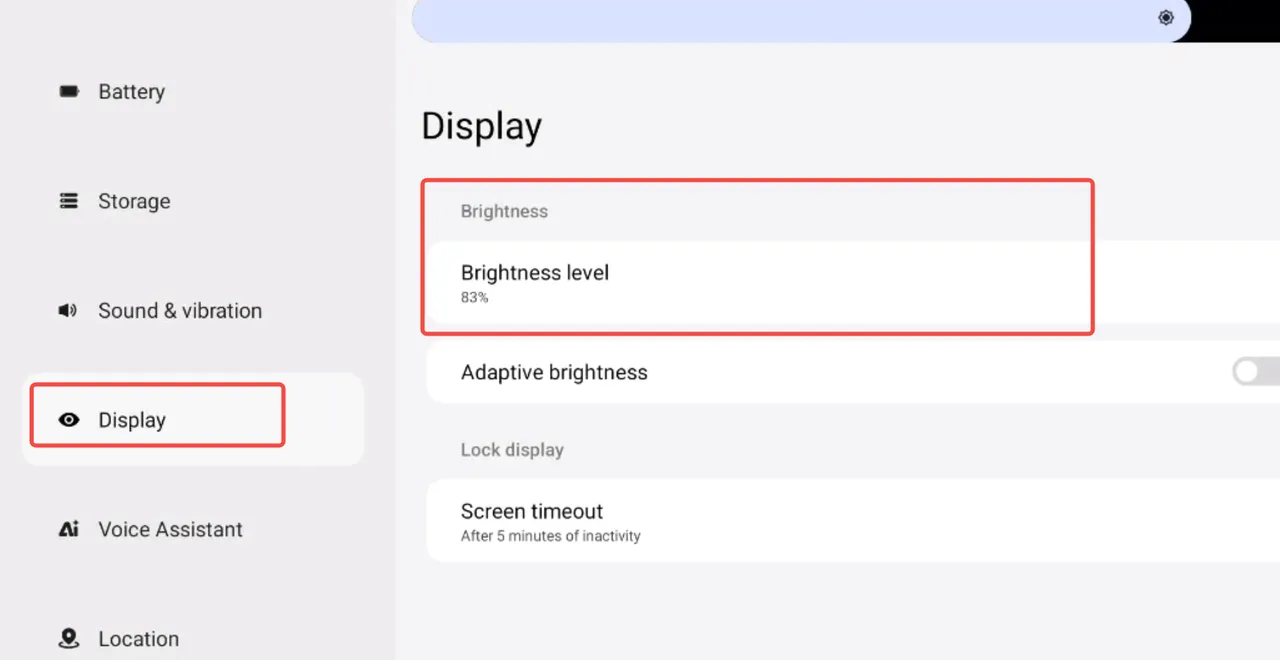
Screen brightness can be adjusted to complement room lighting during media playback. In environments where illumination remains steady, manual brightness allows you to set a fixed level under Settings > Display > Brightness by adjusting the slider. In spaces where ambient lighting shifts, enabling Adaptive Brightness permits the glasses to automatically regulate screen luminance. Both control options and screen timeout settings are detailed in the screen brightness guide.
Recommended Setup Order
Following a practical sequence helps verify that display, alignment, and text settings are in place before you settle in for a film:
- In your video streaming application or media player, select your preferred subtitle track and adjust caption text size where those options are supported.
- Put on the glasses with the chosen nose pad size (S, M, or L) and settle the frame position so the bottom edge of the virtual image remains comfortably in view.
- Open Settings > Display > Brightness to slide the manual brightness to a level suited to your room, or toggle on Adaptive Brightness.
- Play a brief dialogue scene to verify that subtitles are positioned comfortably in view, making minor adjustments to frame angle or in-app text styling if needed.
Frequently Asked Questions
Can INMO AIR3 play 3D movies?
INMO AIR3 supports a dedicated 3D cinema mode in its built-in Gallery application for local 3D video files. To watch 3D content, transfer the video file from a computer to the onboard storage of the glasses, open the file within Gallery, and select the 3D icon in the upper-right corner. The 3D video guide outlines the transfer and playback procedure.
How are replacement nose pads installed on INMO AIR3?
Replacing the nose pad frame involves loosening the retaining screws using the screwdriver included in the replacement kit, seating the new pad assembly onto the bridge bracket, and securing the screws. The nose pad guide provides the step-by-step replacement procedure.
Share:
AR Glasses vs VR Headset for Movies: How INMO AIR3 Handles Viewing and Light Work
Translation Glasses for Technical Terms in Business Meetings: How INMO GO3 Helps