

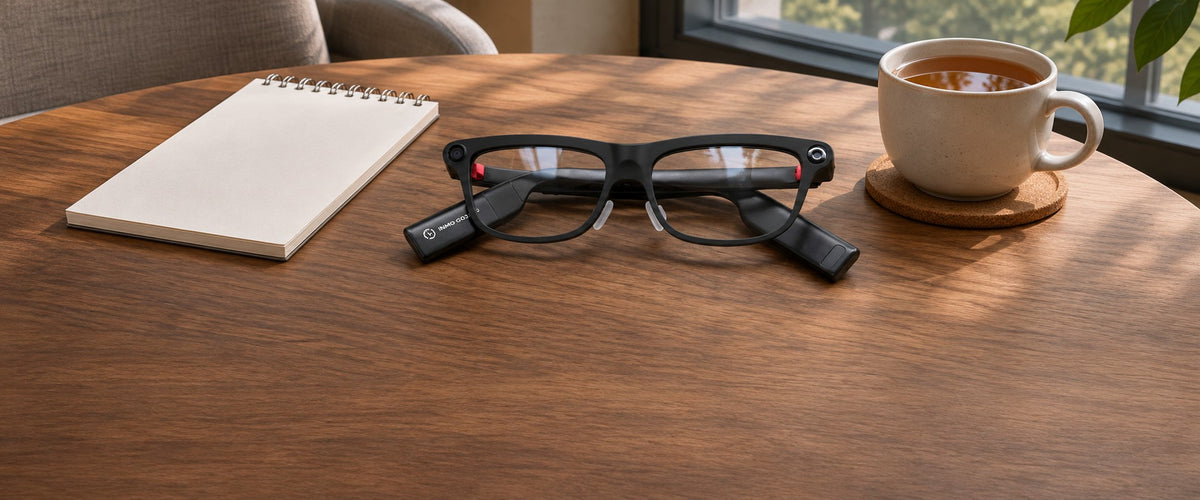
Eye contact in a customer interview tends to compete with note-taking, since every glance down at a notebook takes attention away from the person answering. INMO GO3 suits consent-based, in-person customer research interviews: its INMEET feature records the conversation through microphones in the frame, shows a live transcript on the lens or records with it switched off, and turns each session into a full transcript, summary and to-do items afterward. Consent and quote checking stay with the researcher, who explains the glasses before the first question, starts recording only after the participant agrees, and checks each quote against the transcript and audio.
Is INMO GO3 Suitable for Recording Consent-Based Customer Interviews?
UX researchers, product managers and market researchers running face-to-face sessions with one participant or a small group can use GO3 as the interview recorder. The glasses pick up the conversation through a 4-microphone array with noise cancellation, so the recording holds your questions and the participant's answers while your gaze stays on their face.

A long pause before an answer, a moment of confusion, or a follow-up you chose to skip are observations only the researcher holds, and a few written lines after the session keep them. What GO3 removes is the need to write answers down word for word while the participant talks. The transcript also labels the person wearing GO3 separately from other speakers, so your questions sit apart from the participant's answers when you read the record back. Teams that already record work meetings on the same glasses can carry one routine across both kinds of session.
Explaining the Glasses Before the First Question
A participant who agrees to an interview has agreed to talk, and recording is a separate permission to ask for in its own words. Because GO3 is worn as glasses, there is no recorder on the table for anyone to notice, so the explanation has to say plainly that the frame is recording. Cover the purpose of the study, what is captured (audio, plus a transcript and an AI summary made from it), who on the project will see or hear it, how long it is kept, and that the participant can pause or stop at any moment.
A short spoken version, with your own details filled in:
> This conversation is part of research into [topic]. These glasses record the audio and turn it into a transcript and a summary. Only this project's research team will see or hear it, and it will be deleted by [date]. You can ask me to pause or stop at any point, or take part without being recorded.
Start INMEET after the participant says yes, then ask them to confirm their agreement in one sentence at the start of the recording, so the record carries its own evidence next to the consent entry in your study log. When someone prefers not to be recorded, leave INMEET closed and take written notes; the interview goes ahead with notes as its record. A request to pause partway through is met by pausing the recording and resuming only when the participant is ready.
Running the Session With the Live Transcript Shown or Hidden
Showing the live transcript on the lens helps in sessions full of product names, figures or specialist terms, since a glance at the text catches a term you did not hear clearly. Switching it off keeps your eyes on the participant's face and gestures, and recording with live transcription turned off still leaves you the audio, the marks and the after-session AI.
Marks placed during the interview let playback jump back to those points later. Mark a quotable answer, a change of topic, and any answer that contradicts something said earlier; those marks become the starting list for quote checking.
The routine from settings to export:
- In the INMO Global app, tap INMEET and tap the upper-right corner to open its settings, then choose whether the live transcript shows during the session.
- After the participant agrees, swipe the right temple touchpad to select INMEET and tap to enter; the glasses begin capturing the conversation.
- Mark the moments you expect to quote or revisit.
- Tap once to pause or resume, and double-tap to end the recording.
- Open the saved recording under INMEET in the app and tap Organize with AI; the record then gains a meeting summary, a mind map and to-do items.
- Edit the record's title or export it from the icon at its upper-right corner.
Pulling Quotes From the Transcript Without Losing Context
The AI summary and mind map condense a session into themes, a quick view of what an interview covered and how its topics connected. A quote in a report needs the participant's actual words, so it comes from the transcript and is confirmed against the audio before anyone else reads it.
Read each candidate passage together with the exchange before and after it. The question asked just before an answer shows whether the point was prompted or volunteered, and the next exchange sometimes qualifies it. Replay the passage from the nearest mark as well, because hesitation, emphasis and tone come through in the audio and drop out of written text.
A quote log kept beside the transcript holds each candidate with its source:
| Column | What to write | Why it is there |
|---|---|---|
| Session code | The record title, such as ONB-P07-S1 | Links the quote to the consent entry |
| Quote | The words as heard on replay | Confirms the wording against the audio |
| Question before it | Your question, as asked | Shows whether the answer was prompted |
| Position | The mark or minute you replayed | Lets a colleague find it again |
| Allowed audience | Team, stakeholders or public report | Keeps each use within what was agreed |
Trimming a quote for length is standard practice when the cut is shown with an ellipsis and the meaning stays intact. Make those edits in the quote log or the report, and keep the INMEET record as the unchanged reference.
Session Names, Exports and Who Gets a Copy
A code in place of the participant's name keeps names out of the INMEET list on your phone. A pattern of study, participant, session and date, such as ONB-P07-S1-1119, sorts cleanly and turns up in INMEET search when you type the code. The code covers the title only; names and details spoken during the interview remain in the audio and transcript, so the record still needs careful storage.
A session leaves INMEET in two forms: a combined PDF, Word or TXT document that gathers the marks, to-do items, mind map outline, summary and transcript, plus a separate WAV audio file. Analysts working on synthesis usually need the combined document, stakeholders usually need only the quotes from your log, and the WAV file goes only to people the participant agreed could hear their voice. The article on exporting a full meeting transcript explains what each part of the combined file contains.
When the deletion date from your consent wording arrives, remove the sessions in INMEET one at a time or as a batch. Exported files live outside the app, in shared drives, inboxes and slide decks, so clear those copies in the same sitting and note the date in your participant tracker.
Setting Up a Study Before Interview Day
With the discussion guide drafted and before the first participant is booked, work through these items:
- Highlight the questions in the guide where you expect a quotable answer, so placing a mark at those points becomes routine during the session.
- Run one practice conversation with a colleague using the live transcript setting you plan to use, then open the record to see how the marks and summary look.
- Prepare a one-page note sheet in the guide's question order for participants who decline recording, so their interviews still feed synthesis alongside the recorded ones.
- Plan to run Organize with AI right after each session, while your own observations are fresh enough to read against the summary.
- If a second researcher sits in, agree that their notes cover behavior and the recording covers the words.
With the words held in the GO3 record, the second researcher's sheet can track what a transcript never shows, such as a hesitation, a pointed finger or a puzzled look, with the minute written beside each note. Those minutes match the recording position during quote checking, so an observation and the words spoken at that moment are read together.
FAQ
What if a participant withdraws consent after the interview?
Open that session in INMEET and delete it, and the to-do items generated from the record are deleted with it. Then remove exported copies and any quotes from that session already in your log or slides, and record the withdrawal date in your tracker.
Can GO3 record a remote or phone interview as well?
INMEET also records regular phone calls and calls in third-party apps. Read the consent wording at the start of the call and start the recording only after the participant agrees. Automatic call recording in the INMEET settings fits studies where every participant agreed to be recorded before the call was booked.
How does GO3 handle an interview with two participants?
After the session, INMEET's AI can identify the different speakers in the record, and you can rename each one. Renaming them with participant codes such as P07 and P08 keeps real names out of the speaker labels while still showing who said each line.
Can GO3 translate an interview held in another language?
INMEET can translate while it records, showing the original and translated text together on the glasses during the interview. For the report, each quote comes from the original-language transcript and audio, with your translation beside it in the quote log, so readers see the participant's own words next to the version used in analysis.
Share:
Which INMO GO3 Bundle to Buy for Meetings, Presentations and Client Conversations
Smart Glasses for Outdoor Use: Reading the Display Between the Office and Bright Daylight