

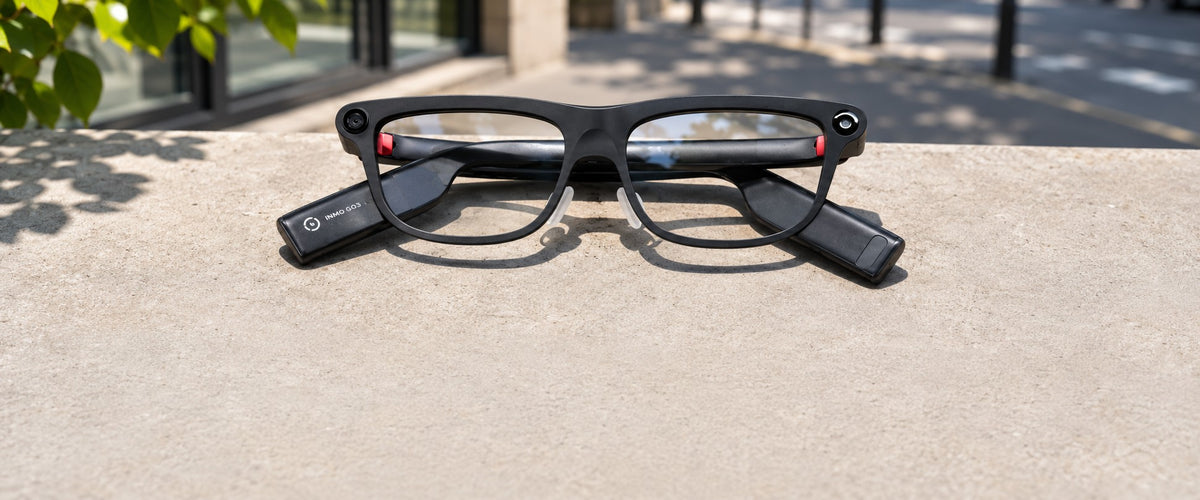
Ambient light shapes how the words on a see-through lens look, because they are always read against whatever sits behind them, and a sunlit street is far brighter than an office wall. Display smart glasses suited to conversations that move between an office and bright outdoor areas therefore give you two separate controls, one for the display and one for the light arriving from the scene. INMO GO3 is built this way: its binocular green display is rated up to 1500 nits at the eye with an adjustable level, and the official INMO GO3 Sunglasses Clip-on adds a polarized lens that attaches to the frame magnetically.
That combination suits people whose conversations cross a doorway several times a day, such as on-site sales staff, guides walking visitors around a property, and managers who split their hours between a desk and a site. In a conversation across two languages, two-way dialogue translation puts the other person's words on your lenses already translated and plays your translated reply through your phone speaker, so the same glasses stay in use from the meeting room out into the daylight.
How Display Light and Daylight Mix on a See-Through Lens
On optical see-through glasses, each eye receives a blend of two kinds of light, one coming from the display and one coming from the scene beyond the lens. The characters are laid over the view, so how strong they look depends on the display output compared with the patch of world directly behind them. A wall or desk under office lighting gives the text a dim background to stand out from, while a pale sky, sunlit stone or bright paving puts far more light behind the same characters and narrows the contrast between text and background.
GO3 uses a binocular monochrome green Micro LED display on diffractive waveguides, rated up to 1500 nits at the eye, with a level you can raise or lower. That figure measures what the display sends toward your eyes, not the light level of the street around you, and the adjustable level is the half of the blend you control from the display side, by matching text strength to the background you face. Cutting the light that reaches your eyes from the scene works on the other half by darkening the background behind the text, and that half is the clip-on's job.
Which Display Smart Glasses Suit Conversations Between an Office and Bright Outdoor Areas?
Glasses for this kind of day need a display level you can change between rooms, a shade accessory made for that exact frame, and, if you already wear glasses, an official way to add your own correction. GO3 handles each with a separate item:
| Control | What it adjusts | When to use it | How you get it |
|---|---|---|---|
| Display level | How strongly the green text shows | Whenever the background behind the text gets brighter or darker | App Touchpad screen in the INMO Global app |
| INMO GO3 Sunglasses Clip-on | Reflected glare and daylight reaching your eyes | Sunny or reflective outdoor areas | GO3 + Sunglasses option, or bought on its own |
| Official prescription lenses | Vision for nearsightedness (SPH) or nearsightedness with astigmatism (SPH + CYL) | For wearers who need vision correction | Custom-made to your eye test values and clipped into the frame |
The display level comes with every pair of GO3 and needs no extra purchase, so it is the control you touch most often in a day of mixed settings. The clip-on is the one physical piece you carry, attached when the sun or reflective surfaces start to dominate the view behind the text. Corrective lenses answer a separate need that has nothing to do with the weather: they bring the scene and the green text into focus for your eyes, while the clip-on deals with glare.
Setting the Display and Clip-On at Each Doorway
The display level lives on the App Touchpad screen of the INMO Global app, on the phone paired with your glasses:
- Open the INMO Global app and tap the "glasses" icon on the homepage.
- On the App Touchpad screen, adjust the brightness of the glasses.
- Look at a line of text against the background where the conversation will take place, and nudge the level up or down until it reads clearly for you.
A level picked while facing a white office wall tells you little about the same text in front of a sunlit building, so make the last adjustment while looking toward the spot where you will actually talk. Step 3 is the one to repeat whenever the setting changes, since the right level follows the background and not the clock.
Heading outside, attach the clip-on and raise the display level in the same pause; coming back in, take the clip-on off and lower the level again. Do both while standing still, at the door or before setting off, and keep your eyes on the path once you are walking beside the other person. Because the brightness control sits on the phone and the clip-on goes on by hand, the whole change fits into one short stop, and the conversation carries on past the door with the light already handled.
The Polarized Clip-On and Reflected Glare
Much of the harsh light outdoors is sunlight bouncing off flat, shiny surfaces such as water, wet paving and car bodywork. Reflected light of this kind is partly polarized, and a polarized lens passes light vibrating in one direction while filtering much of the light vibrating across it, so a share of that reflected glare is held back before it reaches your eyes. The background behind the green text gets darker, and the display output stays at whatever level you set.
The INMO GO3 Sunglasses Clip-on puts that principle on a polarized TAC lens made exclusively for GO3, with a secure magnetic fit and a weight of 2.15 g. The magnet holds it to the frame without tools or small parts, and the light weight adds little to the glasses already on your face. Take it off indoors and GO3 looks like an ordinary optical frame at work again, so the same pair suits a meeting room as readily as a site walk.
GO3 Setups for Mostly Indoor Days, Long Outdoor Days and Glasses Wearers
The standard GO3 set already carries the adjustable display, so work that stays mostly indoors, with short walks outside between meetings, can start there and add the clip-on later, since it is also sold on its own. When long indoor stretches make up most of your week, fit becomes the bigger concern, and the contact points that count over hours of wear are set out in wearing translation glasses through back-to-back meetings.
Roles that keep you outside for long parts of the day, such as site walks, property tours or outdoor sales visits, point to the GO3 + Sunglasses option at checkout, so the clip-on is in your bag from the first sunny appointment. Two questions settle the choice: how many hours a week your conversations happen outdoors, and how often they take place near water or wet paving, where reflected glare builds up. Both options contain the same GO3 glasses, so translation, subtitles and the rest of the feature set stay identical, and the decision concerns only the light around the conversation.
Wearers who already rely on glasses can add the official corrective lenses, which clip into the frame and sit close against the display lenses, with options for nearsightedness and for nearsightedness combined with astigmatism. They are made to order from your eye test values, and reading those values and choosing a lens index are walked through in the guide to prescription translation glasses.
FAQ
Should the clip-on go on during an overcast day?
Grey days range from flat, dull light to bright white cloud cover with reflections off wet streets, so judge by the scene in front of you: attach the clip-on when glare off wet surfaces or a glaring sky makes you narrow your eyes, and leave it in your pocket when neither is there. Because it clips on by hand, adding it halfway through a walk takes only a short stop at the side of the path.
Where should the clip-on go when you take it off indoors?
A jacket pocket or your own glasses case both work, as long as you use the same place every time so the clip-on is ready at the next exit. Keep the polarized lens apart from keys and coins in that pocket, because a scratch on it ends up in your view of the street the next time it goes back on the frame.
Does the translation setup need to change when the conversation moves outside?
Translation languages are set in the INMO Global app before a conversation and stay the same indoors and out; what changes is where the other person stands relative to you. The GO button toggles between two pickup modes: directional, which focuses on sound up to about 2 meters straight ahead, and omnidirectional, which listens across a radius of about 2 meters on every side. Directional pickup fits a conversation across a desk, and omnidirectional pickup fits walking side by side, when the other person is beside you.
Share:
Smart Glasses for User Research Interviews: Recording With Consent on INMO GO3
Smart Glasses for Inventory Photos: Recording Merchandise Condition With INMO GO3