

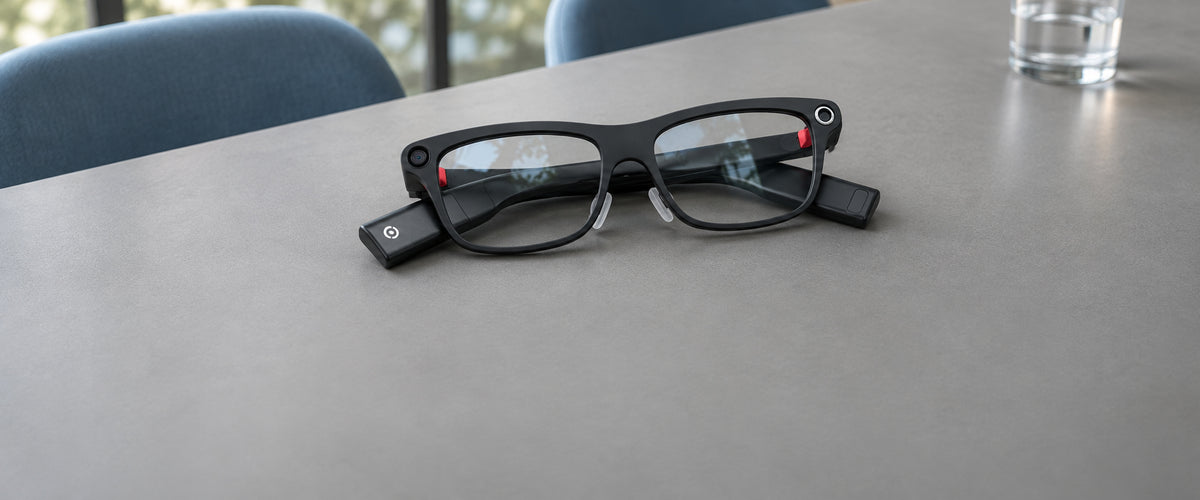
Across several meetings in a row, INMO GO3 is light to wear at about 58g and shows translated subtitles on both lenses through a binocular display. The same pair stays on from the first session to the last, and the slim temples and the pads at the bridge are the main points of contact through the day. In every session, the subtitles appear in front of both eyes while you look at the person speaking.
What makes INMO GO3 comfortable through several meetings?
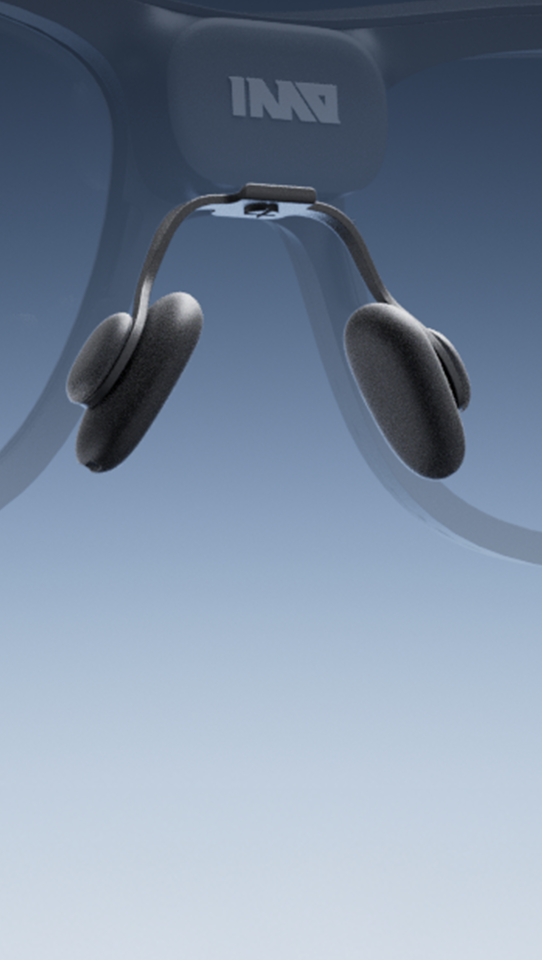
Over a long meeting day, comfort depends on a few physical contact points: the bridge of the nose and the area behind the ears. INMO GO3 uses air-cushioned pads at the bridge and slim temples behind the ears. The same fit checks carry over to a single session that runs for hours, described in comfortable translation glasses for long meetings.
| Contact point | INMO GO3 design | Role across several meetings |
|---|---|---|
| Overall weight | About 58g | Lightweight frame |
| Nose bridge | Air Cushion Nose Pads, breathable and pressure-reducing | Breathable, pressure-reducing cushions on the bridge |
| Temples and ears | 8mm ultra-slim temples, each opening outward by 15° | Slim arms behind the ears |
| Eyes and subtitles | Binocular monochrome green Micro LED with diffractive waveguides | Translations appear on both lenses |
| Lenses and vision | Official custom lenses for vision correction, mounted close to the display lenses | One frame for corrected vision and subtitles |
| Power | Two swappable batteries and a portable charging case | Battery swaps fit into breaks between meetings |
Before the First Meeting: Fit, Brightness and Languages
A few minutes of setup before the first session helps you position the frame properly. Start at the bridge of the nose. Settle the frame so both nose pads rest evenly on either side and the display lenses sit level in front of your eyes. Once the frame is in place, check that the display text sits in your line of sight.
Next, check the temples. Each temple can open outward by 15° from the hinge to suit different head widths, and the 8mm ultra-slim profile lets the arms sit neatly behind the ears without added bulk.

Then set the display brightness to suit the room. With adjustable brightness up to 1500 nits, the display can go lower in a dim conference room with the projector running, or higher in a bright room with daylight from the windows. Finally, set the listening and translation languages in INMEET for the first item on the agenda. The lens can switch between the translation and the original speech, which helps when checking a technical term against the source, and the translation settings stay in sync between the app and the glasses.
GO3 pairs with an iOS or Android phone through the INMO Global app, and setting the source and target languages for the first meeting during setup leaves the glasses ready when the first speaker begins.
Looking over the day's schedule in the morning helps as well. It shows which meetings need translation and in which languages, where the longest stretch without a break falls, and which break suits a battery swap or a quick look back at the translation history.
Reading Subtitles While the Meeting Runs
Real-time translation covers 127 online languages, which lets one pair of glasses follow a day of meetings with different international teams. The same language switch works for a session with an overseas client, a setting explored further in translation glasses for overseas client meetings.
Presentations and talks call for a slightly different setup. When one person speaks for a long stretch and the room mostly listens, translated subtitles in INMEET suit the session well, since you can look at the slides and read the presenter's words in the same direction.
When the next meeting runs in a different language, change the source and target languages before it starts.
Using the Gap Between Meetings
A break between meetings is a good window to clean the lenses or change a battery before the next discussion begins. To clean the lenses, first remove dust particles, then wipe gently with the included lens cloth. Keeping the charging case and the lens cloth together in one bag pocket puts both within reach at each break.
When a battery change is due, take the magnetic battery off the back of the left temple and attach a charged one; holding the power button for about 3 seconds turns GO3 back on. The battery you removed goes into the charging case, so one battery charges while the other is in use. The magnetic change itself takes about 5 seconds.
The 1300mAh charging case holds about 3 to 4 full charges for the batteries, and with both batteries and the case, total use reaches up to 24 hours. The battery placed in the case at one break charges there until a later swap.
Spare minutes in the break are also useful for a quick look back. Translation history from the morning is already in the INMO Global app for later review, so a key term or a decision is easy to look up before walking into the next session.
A short check before each session keeps the day on track: put the glasses on, confirm the subtitles appear where you expect them, and confirm the languages set for the next item on the agenda. If the next meeting is in a different room, set the display level for its lighting at the same time, since a room with a projector running and a room with daylight from the windows call for different settings.
Prescription Lenses for a Full Day in One Frame
Readers who need vision correction can use official custom prescription lenses, which are made to fit INMO GO3 and mount inside the frame, close to the display lenses, so corrected vision and on-lens subtitles come from the same pair. On a meeting day, that means one frame from the first session to the last, with no switching between everyday glasses and translation glasses at each break.
These custom lenses are an accessory ordered separately from the GO3 set and are made for the individual wearer.
FAQ
What should you check when putting GO3 back on for the next meeting?
Settle the frame so both pads rest evenly on the bridge of your nose, and look straight ahead to see that the frame sits level. Then check that each temple rests behind the ear without pressing forward. If the display turned off during the break while the glasses stayed on, a single tap on the power button turns it back on.
Can INMO GO3 record and summarize a meeting as well?
Meeting recording supports live conversations, phone calls, and third-party calls such as WhatsApp and Zoom using a 4-microphone array with noise cancellation. Recordings transcribe automatically, and a one-tap AI summary adds actionable to-do items that you can copy and share after the meeting.
What if one of the meetings is a presentation you give?
The AI Teleprompter puts your script on the lenses and follows your voice as you speak, with Voice-Following in 7 languages. The same frame worn through the earlier sessions then shows your own talk, with pages turning as you speak.
What does the 30° field of view mean when reading subtitles?
The field of view describes how wide the display area appears in front of your eyes, and on GO3 it is 30°, with a 640×480 resolution. Subtitles appear within that area on the lenses, while the room around the text remains visible through the lenses.
Share:
AR Glasses That Work Without a Phone: How INMO AIR3 Runs on Its Own
Translation Glasses for Long Travel Days Without Frequent Charging Stops