


Meetings where you only need the audio and a summary to read afterward are well served by a dedicated AI voice recorder, while meetings where you want to read what is being said as the discussion runs are a better match for smart glasses with a display. INMO GO3 is the stronger fit for that second kind of in-person meeting: its INMEET feature shows a live transcript on the lenses while people talk, and the same recording is organized into shareable meeting notes in the INMO Global app afterward. Three questions settle the choice: do you need text during the meeting, where should the microphone sit, and which files do you need afterward?
Smart Glasses or an AI Voice Recorder: Which Fits In-Person Meetings?
A dedicated AI recorder typically sits on a table or clips to clothing, records the room, and hands the audio to a companion app or service for transcription and summaries. Where that app shows text during the meeting, you read it on a phone or computer screen. Display glasses capture from the wearer's head and place text in front of the wearer's eyes, so the words and the room share the same view.
Meeting software, the third tool most professionals already have, records and transcribes through the platform and plan your team uses, and what it captures depends on the audio input it is given, whether that is a laptop microphone, a room system or a call. Teams that already run their meetings through such a session can often build notes from it. In a room where no one plans to open a laptop or a call, a recorder or a pair of glasses is usually the simpler tool to bring.
| What you need from the meeting | Smart glasses (INMO GO3) | Dedicated AI voice recorder | Meeting software |
|---|---|---|---|
| Read what is said while the meeting runs | Strong fit: text sits on the lenses, in your line of sight | Possible where the app offers live text, read on a separate phone or computer screen | Possible where the platform offers live captions, read on the screen running the session |
| Notes and actions after the meeting | Good fit: the same recording is organized in the app after the meeting | Strong fit: capture and later processing are the core job | Good fit when the session's recording and transcription features are turned on |
| Meetings held mostly as video calls | Covers calls on your phone, including calling apps | Workable when it can pick up the call audio | Strong fit: the call already runs through the platform |
| Files for colleagues | A PDF, Word or TXT document plus a WAV audio file | Set by the companion app | Set by the platform and plan |
| Hands and table space | Microphones are built into the frame you wear | Needs a spot on the table or clothing | Runs on the laptop, phone or room system hosting the session |
When nobody needs text until the follow-up email goes out, a recorder covers the job and a display would sit unused. When you chair discussions, answer questions on the spot, or want to check a figure as it is said, having the words in your line of sight changes how you take part, and that is where GO3 earns its place. The first row is therefore the one to answer for your own meetings. A wider look at smart glasses that record meetings for work shows the other jobs GO3 handles across a workday.
A Live Transcript and Topic Notes at Eye Level
Handwritten and laptop notes both pull your eyes down at the moment something important is said, and checking live text in a recorder's app means turning to a phone. INMEET on GO3 keeps the words at eye level. The glasses' microphones pick up the conversation and the transcript appears on the lenses as people speak, so a figure, a product name or a deadline can be read as it is said while you stay facing the people around the table.
Swiping to the Summary screen shows notes on the topics the meeting has already finished, so in a longer meeting you can check what was settled on earlier points before you respond to a new one. When a commitment or a number comes up, you can also mark that moment during recording, and playback after the meeting goes straight to it.
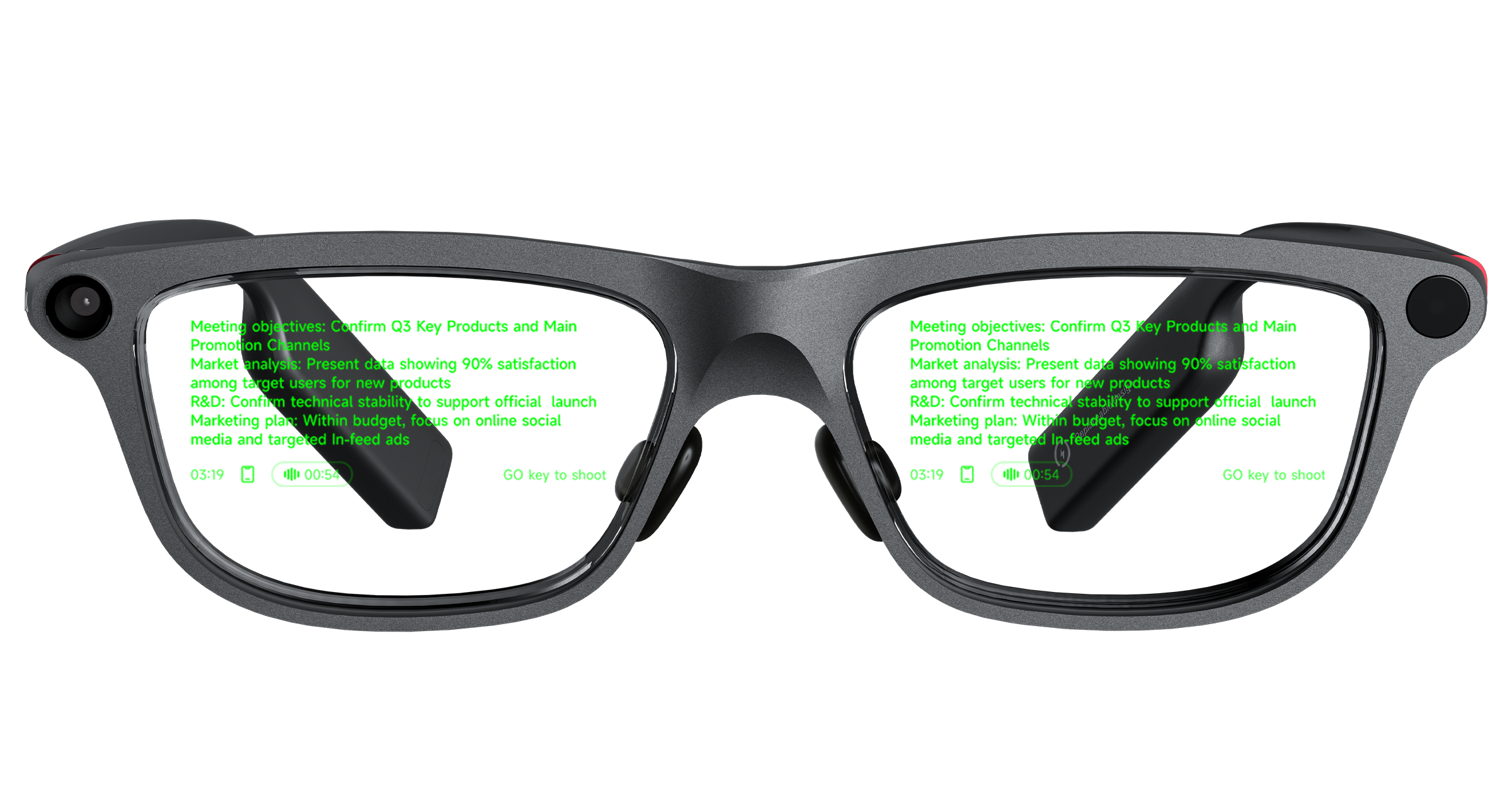
In a one-to-one discussion built on eye contact, live text on the lens can be more than you need, and INMEET can switch off live transcription while keeping the recording, the marks and Organize with AI after the meeting. With that setting the glasses work as a recorder you wear, and live text returns for the next meeting that needs it.
Where the Microphone Sits in the Room
A recorder, like a phone, can be set down wherever you choose, such as the middle of a table. The microphones in a pair of glasses travel with the wearer, so capture follows where you sit and which way you face. That makes placement a planning question for each meeting, separate from whether you want text on the lenses.
GO3 picks up speech through a 4-microphone array with advanced noise cancellation built into the frame. INMEET can also record an on-site meeting with the phone's microphone, so in a long room you can set the phone down near the speakers you most need on record and still keep the session in INMEET. A separate guide looks at recording meetings in noisy rooms in more depth.
INMEET distinguishes the person wearing GO3 from other speakers, and after the meeting the speakers can be identified and renamed. A record with names attached is easier to act on when the follow-up belongs to different people in the room.
From First Word to Shareable Files
The INMEET routine runs in five steps, from the start of a meeting to a file you can send:
- On the glasses, swipe the right temple to INMEET and tap to start recording.
- Tap once to pause or resume, and double-tap to end.
- In the INMO Global app, open the record in INMEET.
- Tap Organize with AI.
- Rename the record or export it from the record page.
Minutes from Organize with AI suit colleagues who need the decisions, while the mind map shows how topics branched, useful after a meeting that covered several projects. To-do items sync to Scheduled Tasks in the app, where reminders reach the glasses when they fall due and can be dismissed or marked as done.
INMEET can combine the transcript, minutes, mind map outline, to-dos and marks into one PDF, Word or TXT document, and the audio exports separately as a WAV file that can be archived with project files. A recorder hands you whatever its companion app supports, so the formats your team already works in are a fair test when comparing devices. The guide to full transcript export and AI summaries walks through what each exported file contains.
Meeting Leaders, Workshop Recorders and Video-Call Teams
People who chair in-person meetings, brief clients or field questions across a table, and want the transcript or topic notes in view while they talk, are the clearest match for INMO GO3. Many of them also handle part of the same work by phone, and GO3 records those conversations in INMEET as well: calls on your phone, including calls in third-party apps, can be recorded, and automatic call recording can be switched on in the INMEET settings. Client calls and table meetings then sit in one list of records, organized and exported in the same way, with no separate recorder to set up or carry.
Anyone whose job is to capture long workshops or interviews, and who never reads text during the session, can pick a dedicated recorder and be well served. GO3 becomes the better purchase for this reader once some of those sessions call for checking a quote or a figure on the lens as it is said, since the same pair then covers both kinds of session.
Teams whose meetings run mostly as video calls should start with the meeting software they already use, and add GO3 when their in-person sessions call for text in view during the discussion. Two swappable batteries and the portable charging case together support all-day use, and a battery swap between meetings takes about 5 seconds.
FAQ
Does INMEET have an option for specialist vocabulary?
INMEET includes Industry Hotwords, a vocabulary option for transcription in online mode, turned on in the INMEET settings in the app. It is aimed at meetings where product names, abbreviations and technical terms come up often. When you set a recorder against glasses, a comparable vocabulary option in the recorder's companion app is a useful point to line up beside it.
How do you find an old meeting record once the list grows?
INMEET keeps recordings as a list in the app that can be searched and renamed, so a clear title added after each meeting makes the record easy to find later. Records sync through the cloud when you are signed in to the same account with a network connection, and single or batch deletion keeps the list down to the meetings you still need.
What happens if the glasses and phone disconnect during a long meeting?
GO3 keeps recording on the glasses while the link to the phone is down. Over Wi-Fi, the missing audio is then added back into the original INMEET record, and running Organize with AI again brings the minutes and to-dos up to date with the completed recording.
Share:
Translation Glasses vs Translation Earbuds: Reading or Listening in a Conversation
Smart Glasses on iPhone vs Android: What Stays the Same on INMO GO3 and What to Check