


INMO GO3 is a strong fit for anyone who wants translation glasses with live subtitles and a conversation history to review later in a phone app. Subtitles appear on the lens while people speak, and the translation history syncs automatically to the INMO Global app, where each session can be reviewed, copied, and shared alongside an AI summary generated for it. For users who attend multilingual meetings, lectures, and conferences, INMO GO3 covers both following the conversation in the moment and returning to it afterward.
Having live subtitles on the lens and saved translation records in the app serves two distinct stages of a conversation. While subtitles keep your attention focused on the speaker rather than looking down at a mobile device, the automatically synced translation history preserves the wording after the spoken text has moved on. For translation sessions, INMO GO3 connects these steps directly, syncing the dialogue you followed on the lens into the translation record you open in the app.
Two subtitle modes on the lens
GO3 offers two subtitle modes designed for different listening needs. Real-Time Subtitles provide a low-latency, dual-language display built for live events and conferences, so the original speech and its translation appear together in your view. Audio Subtitles convert speech into real-time text on the lens using 360° omnidirectional pickup, which suits following a presentation as running text in the language being spoken.

For translation, the display supports switching between a bilingual view and a translation-only view. The bilingual view is especially practical when a speaker uses technical terminology, company names, or numerical figures, because seeing the source phrasing alongside the translation makes it straightforward to verify specific terms. The translation-only view offers a cleaner visual layout during sustained listening, when following the overarching flow of discussion is the main priority.
Presenting subtitles directly on the lens keeps your focus on the room. You can maintain natural eye contact with speakers and colleagues or follow presentation slides while reading subtitles in your line of sight, avoiding the need to look down at a phone screen.

Which translation glasses keep a conversation history you can review in an app?
INMO GO3 automatically syncs translation history to the INMO Global app on your phone, so a translation session followed through lens subtitles becomes a record you can open later. The sequence is straightforward: translate during the session, let the translation history sync to the app, and open the app afterward to review the full translation record, copy or share the saved log, or read the AI summary generated for that session. Details of the Translation History feature are available on the GO3 product page.
Each of these options serves a practical purpose once a meeting or presentation ends. Reviewing the translation history lets you locate a term, figure, or action item that passed quickly across the lens. Copying the saved text allows you to paste the wording into your own notes or meeting records, while sharing sends the log to colleagues who need the reference. The automatic AI summary provides a concise overview of the translated discussion before you review the full text.
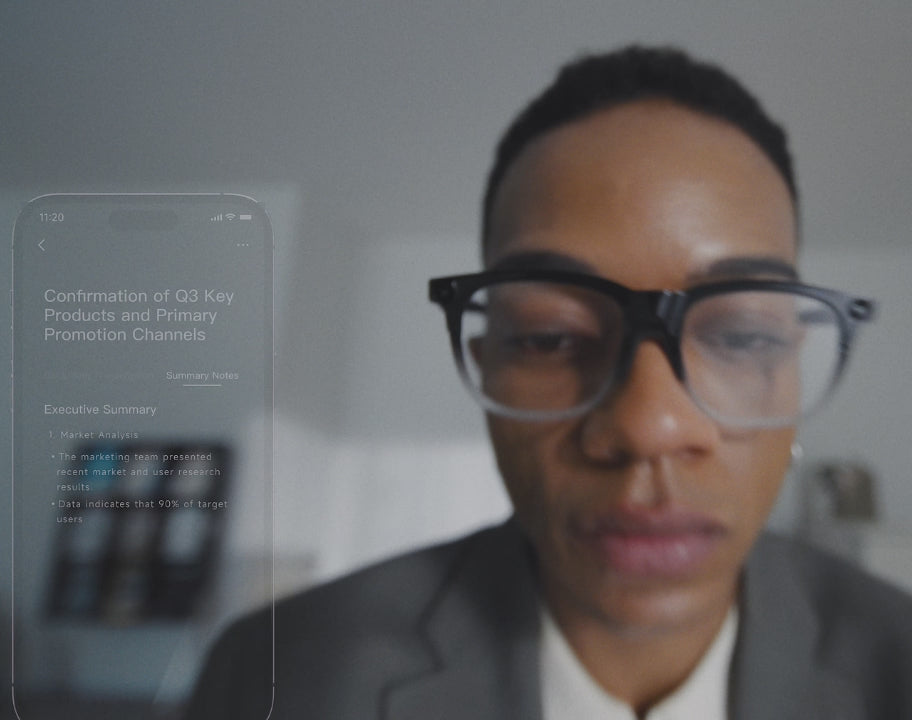
The translation history is organized around translation sessions. When the objective is a written record of spoken remarks in a single language, or an audio recording of a meeting or phone call, the recording feature described below provides a dedicated workflow with its own transcript and summary.
Recording, transcription and one-tap summaries
Beyond live translation, GO3 includes Auto-Record, Transcribe & Summarize as a dedicated tool for turning spoken audio into written text. It records in-person conversations, standard phone calls, and calls placed through third-party services such as WhatsApp and Zoom, then automatically transcribes the audio. In the INMO Global app, a single tap generates an AI summary, and both the transcript and summary can be copied and shared.
Because the two records serve different listening activities, comparing their source and output clarifies which one to select before a session starts.
| Record | Starts from | AI summary | What you can do with it |
|---|---|---|---|
| Translation history | Live translation sessions on the lens | Generated automatically for each session | Review, copy, and share |
| Recording transcript | In-person conversations, phone calls, and third-party app calls | Generated with one tap in the app | Copy and share the transcript and summary |
For an international lecture or cross-language conference, translation history provides the relevant record, growing directly out of the translated subtitles displayed on the lens. For a meeting or call where the priority is capturing original audio and producing written meeting notes, recording mode is the matching choice, with one-tap summaries creating structured overviews of the discussion.
Two-way dialogue: text for you, spoken translation for them
When a session involves an active discussion rather than one-way listening, GO3 supports Two-Way Dialogue Translation. Translated text appears on your lens, while your translated remarks are spoken aloud in the other language through your phone speaker or the optional INMO Speaker. The other party hears the translation spoken aloud directly, allowing conversations to remain face to face without either person needing to look down at a mobile screen or pass a phone back and forth.
The GO button on the temple toggles between directional pickup and 360° pickup. Directional pickup is suited for speaking with an individual seated directly ahead, while 360° pickup captures voices from multiple directions around a conference table. Selecting the appropriate pickup pattern before the discussion begins aligns the microphones with the seating arrangement.
INMO Speaker is available as an optional standalone accessory or in selected bundles, while the standard GO3 bundle includes the glasses, two swappable batteries, and a portable charging case. Like the glasses, the Speaker connects to your phone through the INMO Global app.
Getting GO3 ready before a day of sessions
Before attending a conference or business event, install the INMO Global app from the official download page, which links to the iOS and Android versions, then follow the on-screen prompts to pair the glasses with your phone. During your sessions, GO3 stays paired with your phone so that translation history syncs to the app.
Two swappable batteries and the portable charging case support all-day use across consecutive sessions: one battery powers the glasses while the second battery recharges inside the case. Alternating between the two batteries during breaks between meetings provides steady power throughout the day.
FAQ
Can GO3 show translated subtitles without an internet connection?
Offline translation is available for selected languages once their corresponding offline language packs are downloaded in advance over a network connection. This capability is useful when traveling on flights without Wi-Fi or attending events at venues with limited connectivity. In offline mode, the glasses remain paired with your phone, with translation available for whichever supported language packs have been downloaded in advance.
Is the INMO Speaker accessory required for live subtitles or viewing translation history?
Live subtitles on the lens and translation history in the app function with INMO GO3 paired with your phone, without requiring extra accessories. INMO Speaker is an optional external speaker designed specifically for Two-Way Dialogue Translation, broadcasting your translated words aloud so conversational partners can hear them clearly. When using GO3 without the Speaker accessory, your phone speaker outputs the spoken translation instead.
Does the INMO Global app support both iOS and Android for viewing translation history?
INMO GO3 pairs with both iOS and Android smartphones, and the INMO Global app is available for both platforms through the official download page. On either operating system, translation records automatically sync to the app for review after a session.
What should be charged before a long day of meetings?
Routine charging involves charging your phone, the two swappable batteries, and the portable charging case. The batteries recharge inside the charging case, so starting the day with a fully charged case allows you to rotate batteries across multiple sessions.
Share:
Translation Glasses with Photo Translation for Conversations, Menus, and Signs
How a Software Update Addresses the INMO AIR3 Overheating Recall