

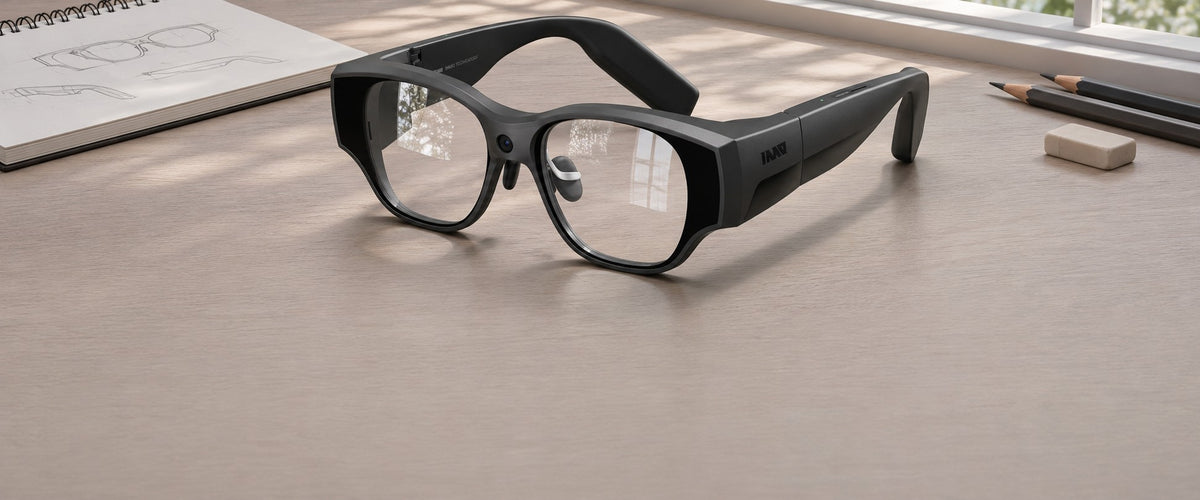
A reference image mirrored to AR glasses sits in the lens display in front of your eyes, and the paper or canvas below stays visible through the see-through lenses. INMO AIR3 handles drawing reference this way: the photo opens on your tablet or phone, that screen is mirrored to the glasses over Wi-Fi, and you keep drawing by hand with the image in view. Cropping, zooming and switching between versions stay on the tablet, so AIR3 works as a viewer for studying a reference and checking your marks against it.
A Reference on the Glasses Versus a Tablet Beside the Paper
A typical photo-reference desk has the tablet standing upright next to the drawing board, angled so you can glance across at it while you work. Mirroring to AIR3 keeps the photo on that same tablet but moves its picture into the lens display, and the tablet itself can go wherever your free hand reaches it.
| Tablet propped beside the paper | Tablet mirrored to INMO AIR3 | |
|---|---|---|
| Where the reference appears | On the tablet screen, beside the page | In the glasses' display, in front of the page |
| Where you look to compare | Across to the tablet | Between the image and the page, through the lenses |
| Where you crop, zoom and switch images | On the tablet | On the tablet, with the result shown on the glasses |
| Where the tablet can sit | Upright, where its screen is easy to read | Flat or upright, wherever your free hand reaches it |
The AIR3 lenses use a see-through optical waveguide, so the page, your hand and the pencil remain visible behind the mirrored picture. The tablet's role shifts from display to a remote control for whichever image you want next.
Can AR Glasses Show a Drawing Reference While You Draw on Paper?
Screen mirroring is the route AIR3 uses for this: an iPhone, iPad or Android device opens the reference, and its screen is cast to the glasses. A photo opened full-screen in the tablet's photo app arrives without album thumbnails around it, and because mirroring sends whatever the tablet shows, a drawing app or reference board app open on the tablet appears on the glasses too.
Portrait studies, still lifes and figure drawing from photos use a reference in short, repeated looks: you study a shape, measure an angle or a proportion against it, and set it down on the page. AIR3 can also run apps as standalone AR glasses, though the tablet is the better home for drawing references, since cropping, zooming and saving versions are already part of its photo tools.

Preparing Reference Versions on the Tablet
Early in a drawing you need the overall shapes and the pattern of light, and later the curve of an eyelid or the grain of a wooden spoon, so one uncropped photo rarely serves every stage. Saving three or four versions side by side in one album before you start lets a single swipe on the tablet move the glasses from one to the next.
Start with the full image, cropped to the composition you plan to draw. Reference photos often carry extra floor, sky or background that the drawing will leave out, and trimming it on the tablet makes the picture on the glasses match the rectangle on your paper. Then make a black-and-white copy with the tablet's photo editor or a drawing app. With color removed, what remains is the value pattern, the arrangement of lights, midtones and darks that gives a drawn object its form.
The remaining versions are detail crops of the slowest areas, such as the eyes in a portrait or the highlight on a glass jar. Zoom in on the tablet and save each crop as its own image, so the area you are working on fills the mirrored view at a useful size. Use photos you took yourself, or images whose license covers what you plan to do with the finished piece, including showing or selling it if that is part of the plan.
Mirroring the Reference and Setting the AIR3 Display
Set everything up before the session starts, with the desk lamp on and the album of reference versions already open on the tablet:
- On AIR3, open Settings → Display. Drag the Brightness slider to set the display level, or turn on Adaptive Brightness to let the level adjust automatically, and choose a Screen Timeout between 15 seconds and 30 minutes.
- Join AIR3 and the tablet or phone to the same Wi-Fi network.
- Start Screen Mirroring from the glasses' App Library and keep that page in view until the tablet finds AIR3.
- On the source device, choose INMO AIR3: on an iPad or iPhone through Screen Mirroring in Control Center, on an Android device through the screen mirroring or casting option in the control menu, and on a HarmonyOS device through the LeBo Cast app, where you sign in, tap Cast to TV and select INMO AIR3.
- Open the first reference version on the tablet in full-screen view.
Any AIR3 you already own should be on system version V3.16, a free online update, before you draw with it, and the INMO Support Center can help with the installation. During the session, lay the tablet on the side of your free hand, so you can switch versions with the pencil still in your drawing hand.
Moving From the Full Image to Detail Crops
Swiping on the tablet changes what AIR3 shows, and the order of versions can follow the stages of the drawing. During the block-in, keep the value copy up, since grouping values into a few large shapes is the first job and the missing color keeps the eye on light and shadow. As the main masses settle, swipe to the full-color crop to check proportions and color temperature across the composition, and pinch to zoom on the tablet when one area needs a closer look before you commit a line.
Detail crops belong to the finishing passes, when the drawing is about edges, textures and small shifts in value. Go back to the full image every so often, because a feature worked on in close-up for a long stretch tends to grow out of proportion with its neighbors. If you measure with a grid, rule a light grid on the paper and add a matching grid to a copy of the reference in a drawing app, then keep that copy in the album as one more version.
Setting the Desk Lamp and the AIR3 Display Level
Light the paper first with a desk lamp aimed at the drawing surface from the side opposite your drawing hand, which keeps the pencil's shadow off the line you are making. A single steady light source also makes graphite and paint values easier to judge on the page.
A lamp that stays in one place suits a fixed slider position, chosen while looking at the paper so both the reference and the graphite marks read clearly. Beside a window, where daylight shifts over an afternoon, the automatic setting follows those changes. With either choice, look at the page and the image together again whenever the lamp moves. A longer Screen Timeout fits sessions where you spend several minutes on the page between looks at the reference, so the image is still showing when you glance back.
If an edge of the mirrored image sits outside your view, adjust the frame position; seeing the whole screen on AR glasses walks through the fit steps for AIR3.
Which Drawing Sessions Suit a Mirrored Reference
Long studies from photos, where you return to the reference many times and move through several versions, gain the most from mirroring to AIR3. Portraits, still lifes, figure studies and value exercises all follow that pattern of repeated comparison, and the album you build for one piece serves every later session on it, so the preparation carries forward.
A quick gesture sketch from a single photo asks less of the arrangement, and a tablet on the desk handles it well. The mirrored setup starts to pay back when a drawing runs past the block-in and you need the value version, the full image and a close-up within the same sitting. Build the album for your next piece before the first line, and run the whole session from the glasses.
FAQ
Is AIR3 better suited to tracing or to drawing from a reference?
The mirrored photo on AIR3 appears as a picture in the lens display, separate from the page, and that suits drawing from observation: you study the image, measure an angle and place the line yourself. Tracing setups work toward a different aim, pinning an outline to fixed points on the paper for the hand to follow. Working from a visible reference trains the eye to compare sizes and simplify shapes, and those skills carry over to drawing from life.
Can the same setup work for painting at an easel?
An easel holds the canvas upright at arm's length, and the mirrored reference on AIR3 sits in front of it the same way it sits over a page on the desk, with the canvas visible through the lenses. Keep the tablet on a side table or the easel tray within reach of your free hand, and light the canvas from the side away from your painting hand. The value version can guide the underpainting and the full-color image the later layers, so the drawing album carries straight over.
Can AIR3 take a photo of a drawing in progress?
A 16MP wide-angle camera is built into the AIR3 frame, so a progress shot of the page can come from the glasses you are already wearing. Taking one at the end of each session gives you a set of images that shows how the piece developed from block-in to finish.
Share:
Teleprompter Glasses for Stand-Up Comedy: Putting Your Set List on the Lens
AR Glasses 3D Video Preview: Reviewing Your Own Stereo Drafts on INMO AIR3