

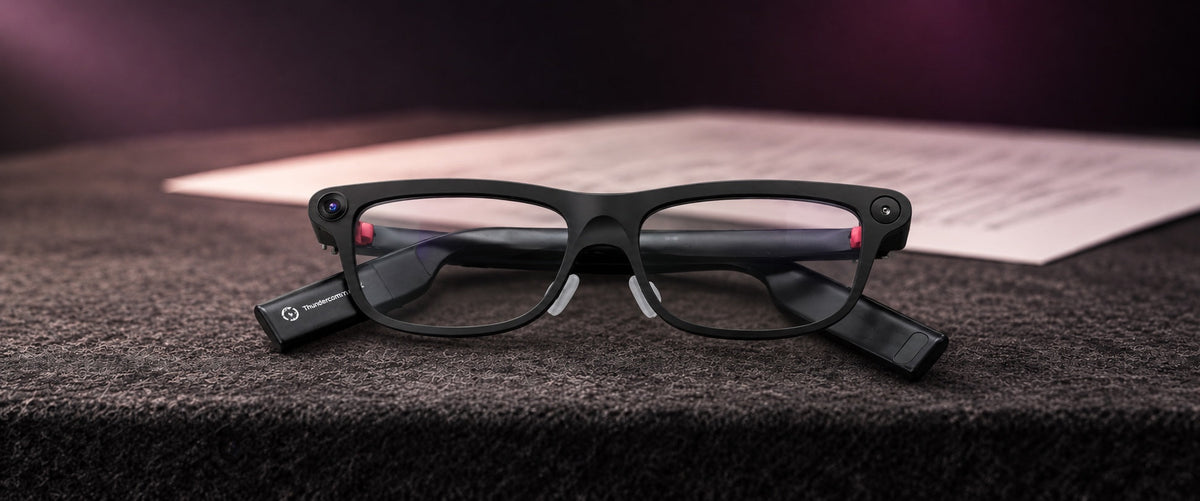
On camera, several visible cues can suggest someone is reading: eyes dropping to locate notes, gaze drifting toward an off-camera screen, or physical pauses and hand movements used to turn a page. Teleprompter glasses place the script directly on the lenses in front of the speaker's eyes, allowing head posture to stay upright and oriented toward the camera while delivering prepared remarks. INMO GO3 pairs this optical position with Auto-Advance, turning pages automatically as the speaker talks so that reading does not require reaching for a keyboard or looking down at printed notes.
Delivery cadence also shapes whether a presentation feels conversational. Even when eye line and posture stay oriented toward the lens, text delivered in a rigid, uniform rhythm can sound like written copy read aloud. Addressing that side of video production comes down to practical preparation: rewriting script lines into conversational language, rehearsing speaking pace, and reviewing a short test recording before the final take.
Looking Down to Find the Next Line
A downward glance is a familiar cue that a presenter is following notes. When a script rests on a desk, a smartphone, or a printed sheet, checking lines can pull the presenter's eyes away from the camera lens. In medium and close-up framing, a downward tilt of the chin makes that shift in gaze apparent on video.
INMO GO3 positions the text directly in the speaker's forward field of view. Its built-in teleprompter displays lines across both lenses using a binocular green Micro LED optical display, keeping words in sight while the presenter faces the camera. For talking-head videos, video lectures, and product explainers, this arrangement means the script moves naturally with the head rather than remaining anchored to an external surface.
Camera height reinforces that alignment. Positioning the camera lens at approximately eye level allows facing the camera and reading the optical display to occur in the same natural posture, without tilting the chin up or down. Loading the script into the glasses beforehand keeps the prompt in view throughout the recording session.
Eyes Drifting Sideways and Visible Page Turns
Another group of reading cues comes from off-axis prompters and manual script controls. A monitor or tablet placed beside the camera pulls the presenter's gaze away from the camera lens axis. Simultaneously, scrolling through slides or tapping a screen introduces physical interruptions, such as looking down at a remote or reaching toward a desk.
Auto-Advance on INMO GO3 addresses page navigation by tracking spoken speech and turning pages automatically. The feature supports seven languages: English, Spanish, French, German, Japanese, Korean, and Cantonese. When speaking in any of these languages, the teleprompter progresses as words are spoken, removing the need to handle a physical control device during delivery.
Manual page turning provides direct control when speech cadence varies or when presentations involve pauses. Swiping the temple touchpad advances the page directly on the frame without requiring separate accessories. Alternatively, pressing the GO button on the optional INMO Ring4 lets a presenter trigger page turns with a hand resting below camera frame. Timing these manual taps to match natural pauses between points keeps delivery steady.
Delivery That Sounds Recited
Beyond head position and page progression, vocal delivery influences how natural a recording sounds. Written copy often contains complex clauses, passive phrasing, and formal terminology that differ from everyday speech. Reading such text verbatim can produce an unnatural cadence, while lengthy sentences offer few comfortable places to pause and breathe.
Refining the script beforehand makes delivery sound more conversational. GO3 supports manual editing directly in the INMO Global app, allowing lines to be reworked after loading rather than requiring edits in the original source document. Breaking long sentences into shorter spoken units, replacing formal wording with direct phrasing, and keeping one core thought per line helps text read smoothly on camera. Shorter lines are also faster to absorb at a glance.
Contractions, straightforward verbs, and occasional rhetorical questions contribute to a conversational style. Reading the edited text aloud once before recording highlights sentences that still feel stiff, making it easier to adjust phrasing before turning on the camera. Presenters who draft outlines on mobile devices can consult the guide to importing teleprompter scripts from your phone for details on transferring text files onto the display.
How Can You Tell If Viewers Will Notice You're Reading?
A short test recording allows a presenter to evaluate eye line, posture, and pacing before committing to a full take. A two-minute trial under the exact lighting and camera setup planned for the video provides an objective look at how the presentation appears on screen.
- Frame the shot with the camera positioned at about eye level.
- Load the prepared script in the INMO Global app and select Auto-Advance or manual page turning.
- Record a short clip covering the opening section of the script.
- Review the playback at normal speed to check head stability and eye direction relative to the camera lens.
- Listen for stiff phrasing or unnatural pauses, adjust the lines in the app, and re-record if necessary.
This trial pass also helps verify lighting placement. Light source positioning relative to the camera influences reflections on eyewear. Once the test clip reflects the intended posture and conversational cadence, the full presentation can proceed. For a comprehensive overview of staging and preparation, refer to the guide on teleprompter glasses for talking-head videos.
Before buying, weigh these on-camera considerations against your recording needs. Our guide to whether teleprompter glasses are worth it for recording YouTube videos can help you decide how a wearable prompter fits your workflow.

Frequently Asked Questions
What happens if I go off script while Auto-Advance is on?
Pressing the GO key disables automatic page turning, preventing spontaneous remarks or unscripted explanations from prompting an unexpected page change. When ready to return to the prepared script, manual page turning allows delivery to resume at your own pace. Structuring a script with clean breaks before planned tangents makes transitioning between prepared text and spontaneous commentary straightforward.
When does manual page turning suit a recording better than Auto-Advance?
Manual page turning is particularly valuable when presenting in languages outside the seven supported by Auto-Advance. It also fits recordings that rely on deliberate pauses, such as silent demonstrations or step-by-step walkthroughs where speaking stops for several seconds. In those moments, manual navigation lets you decide exactly when the next lines appear on the lenses.
How do INMO GO3 glasses look on camera?
INMO GO3 features a lightweight frame designed for an everyday appearance on camera. Its 8mm ultra-slim temples maintain a narrow side profile during three-quarter angles and profile shots, and the CNC-machined matte finish gives the frame a subdued surface. Checking your framing and lighting during a short test take helps confirm how the frame sits on camera before recording.
Share:
How to Copy a Translated Conversation Into Your Notes App With INMO GO3
Are Teleprompter Glasses Worth It for Recording YouTube Videos?