


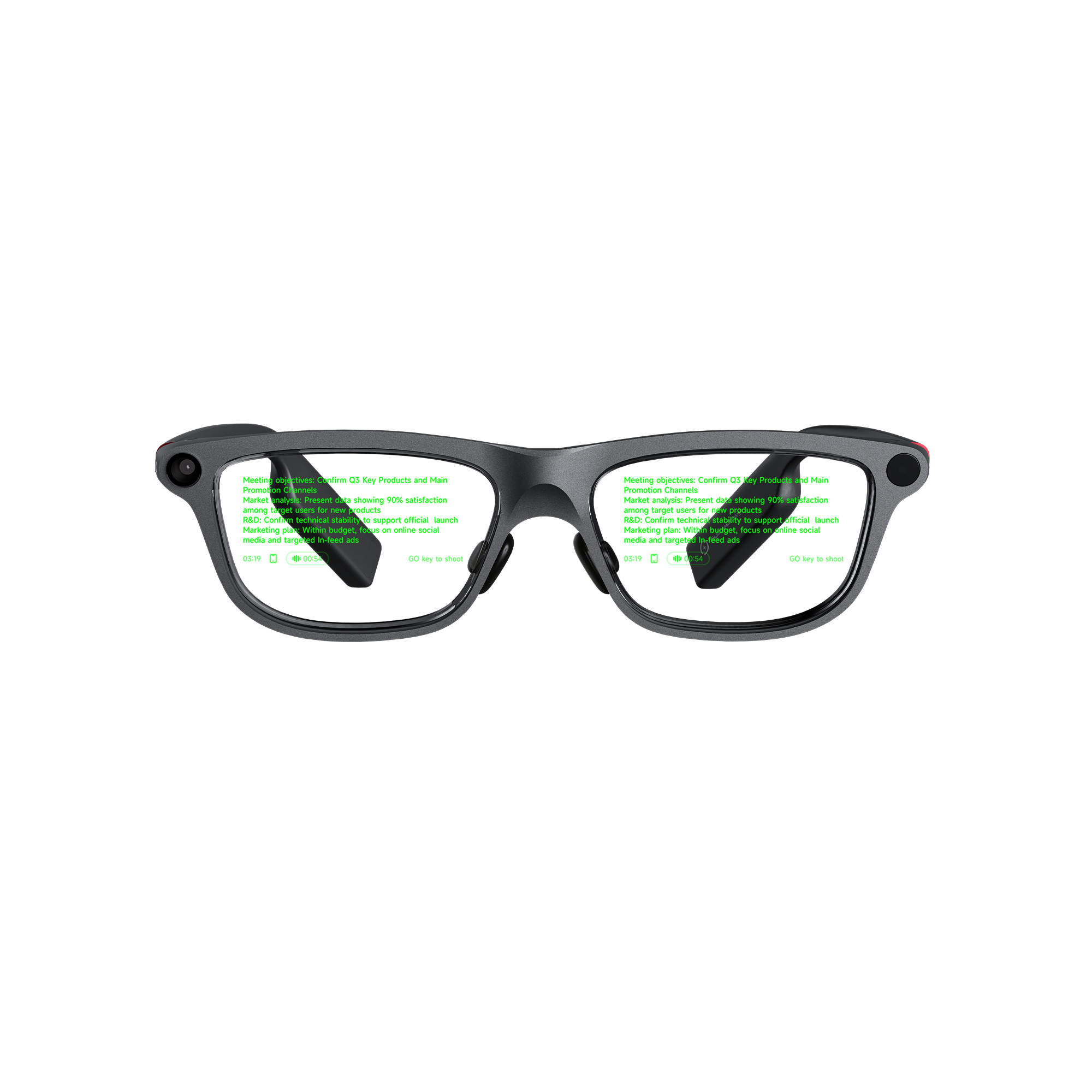
If you only need same-language captions in English meetings, INMO GO3 shows each speaker's words as live English text on the lenses and on your phone through INMEET. When comparing caption glasses, look first at whether they transcribe speech in its own language, not only into a translation, then at how the text is displayed and how speech is picked up. On GO3, the captions sit on a binocular display in front of both eyes, so you can keep facing the room, and the same INMEET session can be kept as a recording when the meeting also needs a written record.
What to compare in smart glasses for same-language captions
On GO3, live captions, translation and meeting recording all run inside INMEET, introduced with version 3.0 of the INMO Global app. For an English meeting, INMEET shows the speaker's words as English text, and translation only comes in when part of the discussion moves into another language.
| What to compare | How it works on GO3 |
|---|---|
| Same-language captions | Live English transcription in INMEET, with no translation step |
| Where the text appears | On the lenses and on your phone at the same time |
| Display | Green Micro LED text through diffractive waveguides, 640×480 resolution, 30° field of view |
| Brightness | Adjustable up to 1500 nits for bright rooms or dimmed presentations |
| Speech pickup | A four-microphone array with noise reduction, or your phone's microphone for an in-person recording |
| Specialist vocabulary | An industry term list chosen to match the meeting's subject |
| Weak connection | Offline transcription, with language packs managed in the INMO Global app |
| Several sessions in one day | A GO key shortcut that starts and ends each INMEET session |
Captions Inside INMEET in the INMO Global App
INMEET keeps recording, transcription and translation in one place.
INMEET translation settings sync between the app and the glasses. You can also set INMEET to open on the transcription page by default, which puts the running text first as the meeting starts. The app's appearance can follow the phone's system setting or stay in light or dark mode, and a dark screen suits a room dimmed for slides.
When part of the discussion moves into another language, online translation adds the translated meaning, and the lenses can switch between the original wording and the translation. The original wording is the one to read when a name or a figure needs to be checked in the speaker's own terms, and the translated view is the one to keep on while the other language continues.
Setting Up INMEET Captions Before a Meeting Starts
Before the discussion begins, open INMEET and set the listening language to English, the language the captions will follow. Set the display brightness for the room's lighting, and pick an industry term list if the agenda is full of product names or technical terms.
In an in-person meeting, choose whether INMEET captures the room through the microphones on the glasses or the microphone on your phone. The glasses keep the microphones with you as you move around the table, while the phone can sit in the middle of it. Across several sessions, a GO key shortcut can start and end each INMEET session, with pause and resume available for breaks.
When remote participants join by phone or through a calling app, INMEET can record the call as well, and it includes an automatic call recording switch.
Two swappable batteries and a portable charging case come with every GO3 and cover all-day use, and changing a battery takes about five seconds between sessions.
Reading Captions Through a Long Meeting
GO3 weighs approximately 58g and has 8mm ultra-slim temples and air cushion nose pads. These are useful physical details to consider alongside the display when choosing glasses to wear during meetings. If you wear prescription glasses, GO3 can be fitted with official custom prescription lenses, so the captions and your usual vision correction come in one frame.
Different kinds of meeting call on different INMEET options:
| Meeting type | Caption setup |
|---|---|
| In-person discussion | Glasses microphones, live English transcription on the lenses |
| Meeting held on a phone or app call | System call or third-party app call recording, with an automatic call recording switch |
| A meeting where you present | Live transcription turned off while you speak, recording and marks still running |
| A segment in another language | Online translation, switching to the original wording for names and figures |
Following the Meeting With INMEET Captions
A few INMEET options fit common moments in a meeting. Live transcription can be turned off during the meeting, for example while you present. The recording, any marks and the AI notes after the meeting continue as before.
While the meeting runs, notes for topics that have already finished appear on the lenses, so an earlier point can be found again without scrolling back through the captions. INMEET shows the status of a meeting that is still recording, and you can return to the same meeting record from it.
Keeping a Written Record After the Meeting
When a meeting needs a written record, the same INMEET session can be turned into a transcript, notes and to-do items after the meeting, with an internet connection. INMEET distinguishes your words from other participants' words, which keeps the record readable when several people spoke, and after the meeting speaker names can be assigned and corrected. The transcript and notes can be exported together as a PDF, Word or TXT file for colleagues who were not in the room, and any marks you placed while reading the captions are included. In the app, the recording itself plays back with a progress control. The guide to smart glasses meeting recording with noise reduction explains the recording side in more depth.
FAQ
Can I mark an important moment while the captions are running?
INMEET lets you mark a key point while the recording continues. During playback afterward, each mark takes you to that point in the meeting, so a decision or figure can be found again without replaying the whole session.
Can captions run when the meeting room has a weak connection?
INMEET includes offline transcription, with the language packs managed in the INMO Global app. Download the packs you need before a meeting where the connection may be unreliable, and keep the glasses paired with your phone.
What if part of an English meeting switches to another language?
INMEET can detect the listening language automatically when you are online, and the lenses can switch between the original wording and the translation. For a discussion that moves between languages, select the translated display when you want to read the meaning in English. Return to the original wording when the discussion goes back to English and your reading task changes with it.
Share:
Teleprompter Glasses for Natural Eye Contact: Script Preparation and Practice
Spare Battery vs. Fixed Battery Translation Glasses for a Long Travel Day