


Translated speech appears as green text on the lenses of INMO GO3, and a built-in 4-microphone array records meetings and calls, so live translation and meeting recording each have a dedicated workflow in one pair of smart glasses. Translation sessions are saved for review after the meeting, and each recording becomes a text transcript with a one-tap AI summary.
Which Smart Glasses Offer Separate Translation and Meeting-Recording Workflows?
On INMO GO3, a binocular Micro-LED optical display presents green text within your line of sight, while an array of four microphones equipped with noise cancellation captures nearby speech.
The display has a 30° field of view at 640×480 resolution, with brightness up to 1500 nits. That gives translated lines and subtitles a defined reading area in front of you, so you can glance at a line of text and return your attention to the person speaking. Brightness is adjustable, so the text level can be set to match the lighting around you.
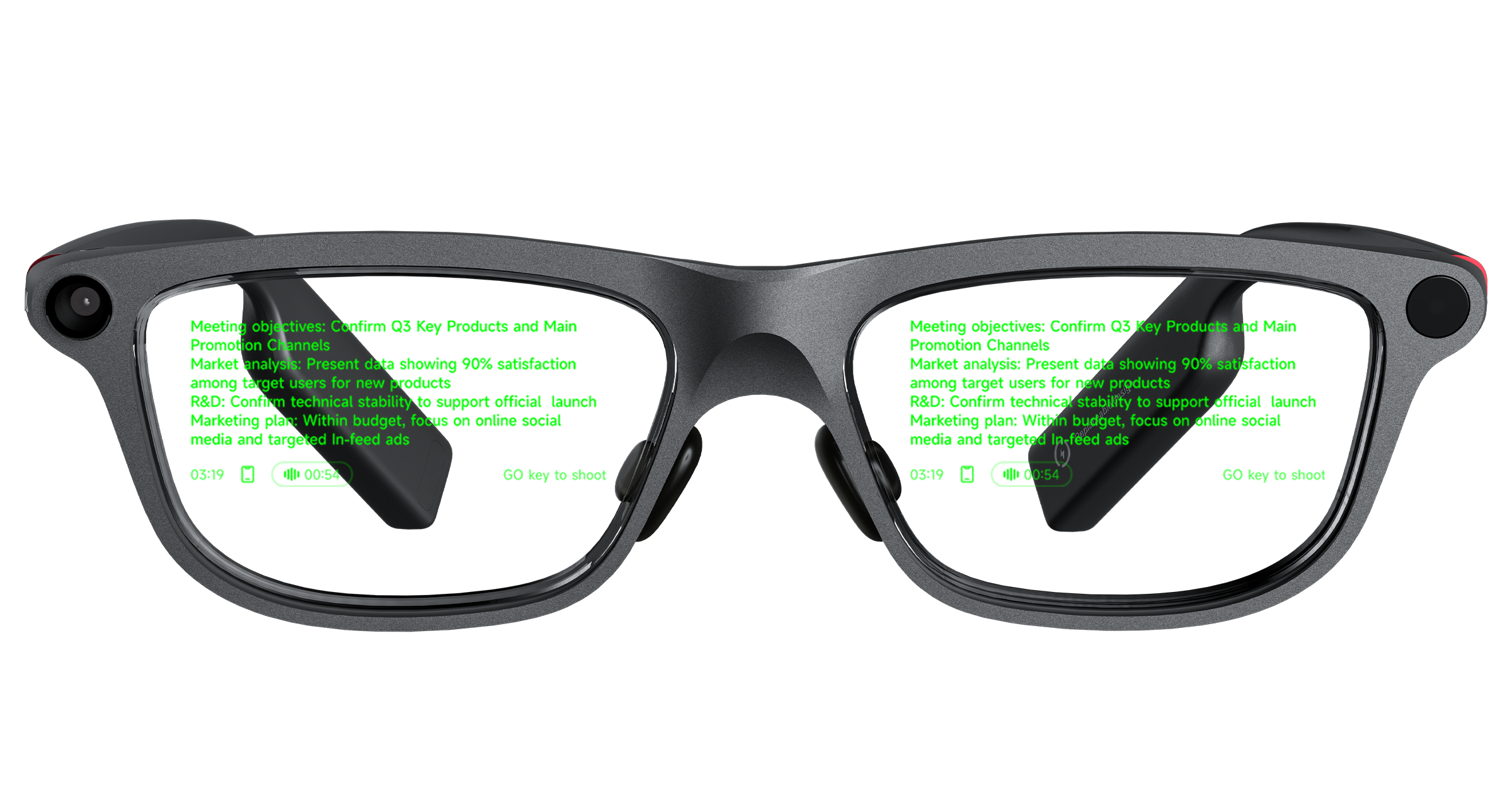
In the translation workflow, real-time translation covers 127 languages online. Text appears on the lenses in either a bilingual layout or a translation-only layout. The bilingual option is especially practical when discussing technical subjects, because viewing the original statement alongside its translation helps users verify product terms, technical specifications, and key phrases during the conversation. INMO GO3 also includes 21 industry glossaries.
Real-Time Subtitles provides a dual-language display on the lenses for live events and conferences, which helps you follow a presenter speaking to a full room. Photo Translation brings the on-lens display to written text: point your camera at any text, such as a printed agenda in another language, and the translation appears on the lens. The built-in camera has a physical lens cover, so it can stay closed for the rest of the meeting once the document is translated.
Dialogue translation handles two-way conversations in 78 languages on Android and 82 on iOS. You read the translation on the lens while your conversation partner hears your reply spoken aloud in their language, so the exchange carries on by voice. That audio plays through your phone speaker or the optional INMO Speaker. A dedicated GO button on the temple lets users toggle between directional pickup for one-on-one dialogue and 360 pickup for conversations around a table.
In the recording workflow, INMO GO3 captures spoken dialogue from conversations and calls. The 4-microphone array with noise cancellation focuses on voice capture during discussions, allowing hands-free recording while you stay engaged with the room. Each recording becomes a written transcript of the conversation, ready to review after the meeting.
The Two Workflows, Step by Step
| Step | Translation workflow | Recording workflow |
|---|---|---|
| Start | Select real-time translation for continuous speech or dialogue translation for two-way exchanges | Begin recording an in-person meeting, phone call, or third-party app call |
| During the conversation | Translated text appears on the lenses in bilingual or translation-only format; in dialogue translation, your conversation partner hears the translation spoken aloud | The 4-microphone array captures spoken audio with noise cancellation |
| Where it is saved | Translation history syncs automatically to the INMO Global app for later review | Each recording is transcribed into text for later review |
| After the meeting | Review, copy, and share the full translation history, accompanied by an automatically generated session summary | Generate an AI summary with one tap, then copy or share the transcript and summary text |
Translation History, Transcripts, and AI Summaries: What Each Record Is For
The translation history preserves the dialogue translated during a session and is saved automatically alongside a session summary. It is the record to check for the exact terms international partners used before you send follow-up messages.
For recorded meetings, the transcript provides a written record of the conversation, making it useful when you need to review specific discussion points, operational requirements, or agreed next steps. The accompanying AI summary distills the session into main points that can be reviewed quickly.
Recording team meetings at work is covered in more depth in smart glasses that record meetings for work.
Matching the Features to Your Meetings
Meetings with international clients and partners make the most of translation. Real-time translation keeps you following the speaker on the lenses, dialogue translation lets you respond in your own language, and the translation history preserves a record of the exchange to review before you write follow-up messages. The overview on translation glasses for overseas client meetings details how these features support international client discussions.
Team meetings, project reviews, and phone calls with colleagues get the most from recording. Hands-free capture through the 4-microphone array produces a text transcript and an AI summary, giving you a written record of decisions and agreed next steps while you stay focused on the discussion.
Same-language meetings also have an on-lens reading option. Audio Subtitles displays real-time speech-to-text subtitles on the lens with 360 omnidirectional pickup, which helps you follow a discussion around the table as it unfolds.
When you present, the built-in teleprompter displays your script on the lenses and turns pages automatically in 7 languages: English, Spanish, French, German, Japanese, Korean, and Cantonese. Scripts import as TXT files on both iPhone and Android, and iPhone also takes PDF and Word files, so talking points prepared for a project review or client presentation sit in your line of sight while you speak. The optional Ring4 adds gesture control for turning teleprompter pages, giving you a manual way to set the pace of your script.
Frequently Asked Questions
Can INMO GO3 record phone calls and online meetings?
The recording workflow handles regular phone calls as well as voice and video calls conducted through third-party apps such as WhatsApp and Zoom, alongside standard in-person meetings. Call audio is transcribed into text automatically, and a one-tap AI summary is available just as it is for an in-person discussion.
How does the translation summary differ from the recording summary?
The translation summary is generated automatically from the translated dialogue in a session, making it useful for reviewing key points from a cross-language conversation before drafting follow-up messages. The recording summary is generated with one tap from recorded meeting or call audio, providing a quick overview of the spoken discussion that you can review or share with your team.
How can you share both records with colleagues after a meeting?
Translation histories, meeting transcripts, and AI summaries can all be copied or shared into emails, shared documents, or messaging threads, so everyone works from the same record of the meeting.
How does offline translation work on INMO GO3?
Offline translation keeps conversations moving in rooms or on flights without Wi-Fi. It covers 9 languages: Chinese, English, Spanish, French, German, Russian, Japanese, Korean, and Thai. Download the offline language packs in the INMO Global app ahead of the meeting or trip.
Share:
INMO AIR3 Recall in the US and Canada: How Scope and Support Compare
Teleprompter Glasses Script Formats on iPhone and Android: TXT, PDF, and Word